A minimal feed-style theme for Ghost CMS 6.0+. Built with a focus on readability, clean typography, and perfect mobile responsiveness.
Version: 0.0.4
Developer: runawaydevil
Ghost Version: 6.0+
Repository: runawaydevil/skullx
SkullX is a Ghost theme designed for content-focused publications. It features a clean feed-style layout with optimized reading width, fully responsive design, sidebar with author information, and support for Ghost's native features including members, subscriptions, and multi-language content.
- Perfect Mobile Responsiveness: Complete overhaul of mobile layout with properly aligned images and optimized spacing
- Fixed Image Alignment: Featured images in cards now perfectly align with card borders
- Unified Breakpoints: Standardized responsive breakpoints across all components (740px mobile, 980px tablet)
- Improved Layout: Cards now use vertical stacking on mobile for better user experience
- Optimized Spacing: Reduced padding and improved spacing for mobile devices
See RELEASE_NOTES_v0.0.2.md for full details.
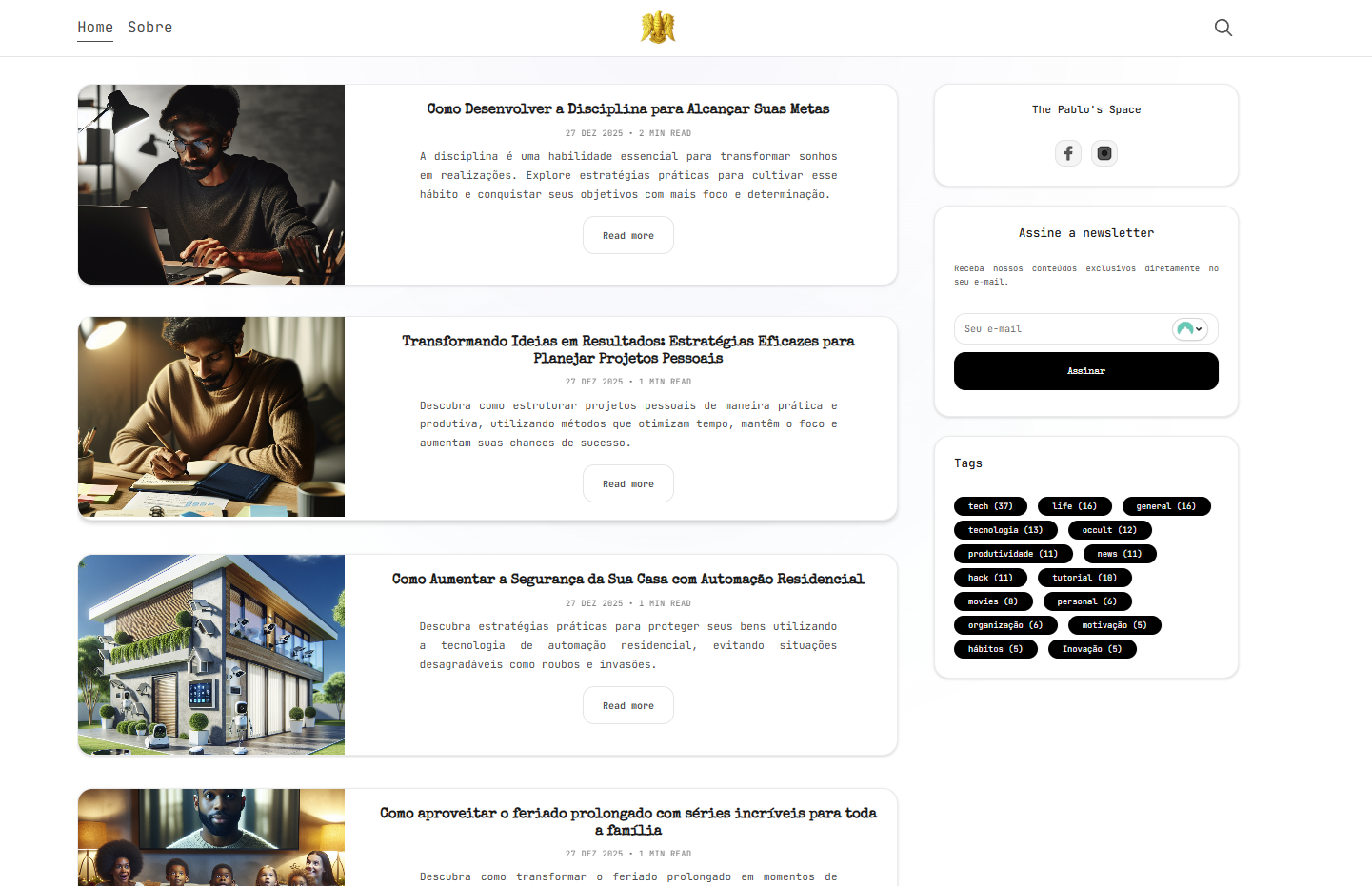
- Feed-style layout with optimized reading width (72ch)
- Fully responsive design for mobile, tablet, and desktop with perfect image alignment
- Sidebar with author information, latest posts, and tag cloud
- Automatic table of contents (TocBot) for posts
- Syntax highlighting with Highlight.js
- Search functionality
- Members and subscriptions support
- Multi-language support (i18n) - Portuguese (BR), English, Russian
- Customizable theme settings via Ghost Admin
- Perfect mobile experience with optimized cards and spacing
- Download the latest release from GitHub Releases
- Navigate to Settings → Design → Change theme
- Click Upload theme and select the downloaded ZIP file
- Activate the theme
cd content/themes
git clone https://github.com/runawaydevil/skullx.git
Restart Ghost and select the theme from Settings → Design.
- Node.js v22 or higher (required for Ghost 6.0+)
- Ghost CMS 6.0 or higher
- npm or pnpm package manager
- Clone the repository:
git clone https://github.com/runawaydevil/skullx.git
cd skullx- Install dependencies:
npm install
# or
pnpm install- Link the theme to your Ghost installation:
# On Linux/Mac
ln -s /path/to/skullx /path/to/ghost/content/themes/skullx

# On Windows (PowerShell as Administrator)
New-Item -ItemType SymbolicLink -Path "C:\path\to\ghost\content\themes\skullx" -Target "C:\path\to\skullx"- Restart Ghost and select the theme from Settings → Design
Start development mode with live reload:
npm run devBuild for production:
npm run buildCreate a ZIP archive for distribution:
npm run zipTest theme compatibility with GScan:
npm run testThe sidebar includes the following components:
- Table of contents (TocBot) - appears on posts
- Author information with social links
- Latest posts (5 most recent)
- Tags cloud (15 most used tags)
You can customize the sidebar by editing partials/sidebar.hbs.
To add custom social links in the sidebar, navigate to Settings → Code Injection → Site Header and add:
<script>
    var SOCIAL_LINKS_COLLECTION = [
        {
            title: "Telegram",
            href: "https://t.me/your_username",
            svg: "<svg>...</svg>",
        },
        {
            title: "Github",
            href: "https://github.com/your_username",
            icon: "https://github.githubassets.com/images/modules/logos_page/GitHub-Mark.png",
        }
    ];
</script>
Social links options:
href- Link URL (required)svg- SVG icon codeicon- Link to icon imagetitle- Link title (optional)class- Additional CSS class (optional)
Customize the table of contents by adding this to Settings → Code Injection → Site Header:
<script>
    var TOC_BOT_OPTIONS = {
        collapseDepth: 0,
        // See full options: https://tscanlin.github.io/tocbot/#api
    }
</script>The theme includes customizable settings accessible via Settings → Design → Theme settings:
- Font: Choose between Monospace, Serif, or Sans-serif
- Layout: Full-width, 1220px, or 960px container width
- Content Width: 720px, 760px, or 820px
- Grid Gap: 20px, 24px, or 28px
- Card Image Ratio: 3/2, 4/3, or 16/9
- Card Image Height: 180px, 220px, or 260px
- Card Radius: 12px, 14px, or 16px
- Card Shadow: none, soft, or medium
- Post Feature Ratio: 16/9, 2/1, or none
- Show Newsletter: Enable/disable newsletter widget
- Show Tags: Enable/disable tags widget
- Show TOC: Enable/disable table of contents
- Show Author Card: Enable/disable author card
skullx/
├── assets/          # CSS, JS, and images
│   ├── built/       # Compiled assets (generated)
│   ├── css/         # Source CSS files
│   ├── js/          # Source JavaScript files
│   └── images/      # Theme images
├── locales/         # Translation files
├── members/         # Member templates (signin, signup, account)
├── partials/        # Reusable template partials
│   ├── card.hbs     # Post card for index
│   ├── card-short.hbs # Post card for sidebar
│   ├── pagination.hbs
│   ├── sidebar.hbs
│   └── icons/       # SVG icons
├── default.hbs      # Main template
├── index.hbs        # Home page
├── post.hbs         # Post template
├── page.hbs        # Page template
├── tag.hbs         # Tag archive
├── author.hbs      # Author archive
├── error.hbs       # Error page
├── package.json
└── README.md
You can create custom templates for specific pages by adding the slug to the template name:
page-about.hbs- Custom template for/about/pagetag-news.hbs- Custom template for/tag/news/archiveauthor-jamie.hbs- Custom template for/author/jamie/archive
- Complete mobile responsiveness overhaul
- Fixed featured images alignment in cards
- Unified breakpoints across all components
- Improved layout and spacing for mobile devices
- See RELEASE_NOTES_v0.0.2.md for details
- Initial release
- See RELEASE_NOTES_v0.0.1.md for details
The theme supports all modern browsers as defined by the browserslist configuration in package.json (defaults to current browser versions).
Contributions are welcome. Please follow these steps:
- Fork the repository
- Create your feature branch (
git checkout -b feature/AmazingFeature) - Commit your changes (
git commit -m 'Add some AmazingFeature') - Push to the branch (
git push origin feature/AmazingFeature) - Open a Pull Request
This theme is released under the MIT License.
Copyright (c) 2024 runawaydevil
Copyright (c) 2013-2024 Ghost Foundation - Released under the MIT License.
- Based on PurpleDark theme by rame0
- Based on the Ghost Starter theme
- Icons by Icons8
- Syntax highlighting by Highlight.js
- Table of contents by TocBot
For issues, questions, or contributions, please visit the GitHub repository.