

A simple extension to the standard Android EditText which shows an icon on the right side of the field and lets the user toggle the visibility of the password he puts in.
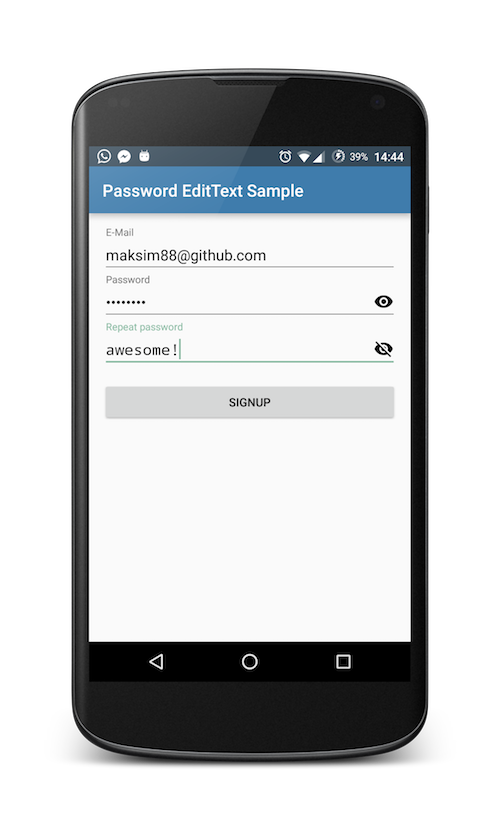
For a complete sample you can check out the sample project provided within.
In short:
Just include the PasswordEditText instead of the standard EditText and you are good to go.
<com.maksim88.passwordedittext.PasswordEditText
            android:id="@+id/input_password"
            android:layout_width="match_parent"
            android:layout_height="wrap_content"
            android:inputType="textPassword"
            android:hint="Password" />
You can also wrap PasswordEditText inside a TextInputLayout to get a material design moving label on top:
<android.support.design.widget.TextInputLayout
        android:id="@+id/input_layout_password"
        android:layout_width="match_parent"
        android:layout_height="wrap_content">

        <com.maksim88.passwordedittext.PasswordEditText
            android:id="@+id/input_password"
            android:layout_width="match_parent"
            android:layout_height="wrap_content"
            android:inputType="textPassword"
            android:hint="Password" />
    </android.support.design.widget.TextInputLayout>
Note: be sure to include the design library to use TextInputLayout. (for more details see sample)
You can add your own custom icons which are shown on the right side of the EditText.
Do this by first adding the custom namespace to your root layout, e.g.:
<LinearLayout
    [...]
    xmlns:app="http://schemas.android.com/apk/res-auto"
    [...]>
</Linearlayout>
After that you can add the icons with the attributes app:pet_iconShow and app:pet_iconHide:
<com.maksim88.passwordedittext.PasswordEditText
    [...]
    app:pet_iconShow="@drawable/..."
    app:pet_iconHide="@drawable/..."
    [...]
/>
For a working example check out the activity_main.xml inside the sample project.
Just include jitpack.io inside of your root project build.gradle:
allprojects {
		repositories {
			...
			maven { url "https://jitpack.io" }
		}
	}
After that you can easily include the library in your app build.gradle:
dependencies {
	        compile 'com.github.maksim88:PasswordEditText:v0.4'
}If you have any questions feel free to open a github issue with a 'question' label
Licensed under the MIT license. See LICENSE.