1. Read all WorkBooks - List WorkBooks and their WorkSheets name along with indicating emtpy WorkSheets.
2. Read a single WorkBook - List a WorkBook and its WorkSheets along with indicating empty WorkSheets.
This project can make all these operations to be performed a lot easier.
6. Inside commandBook folder make a WorkBook with name commandBook.xlsx having a sheet with name commandSheet.
commandSheet contains all the commands to perform the operations on workbooks in your resourceBook folder.
This will read all the workbooks in you resouceBook folder and list it down in your commandSheet.
| Input | Result |
|---|---|
 |
 |
This will give the result in the order WorkBook Name -> WorkSheets -> ....
WorkSheet names will be ',' separated. The left side of '|' contains all the sheets which do not have all cells empty while those in the right side of it will be all empty sheets.
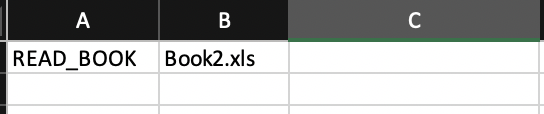
This will read a single workbook and list down its worksheet names.
| Input | Result |
|---|---|
 |
 |
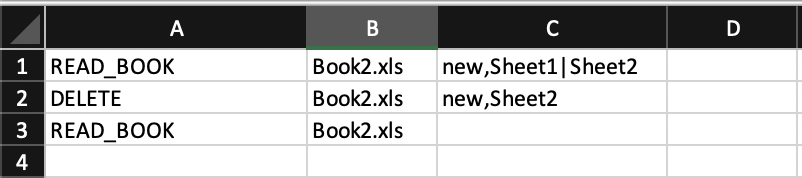
This will Delete all the given list of sheet names from the workbook.
| Input | Result |
|---|---|
 |
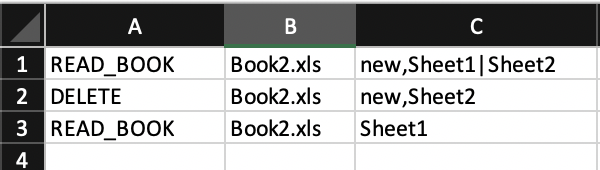 |
Note: The two READ_BOOK commands are given just for illustration purpose to check if the operation has been performed correctly or not and also in the first READ_BOOK command the next cells after the book name are just the result of previous operation they are not arguments to be passed.
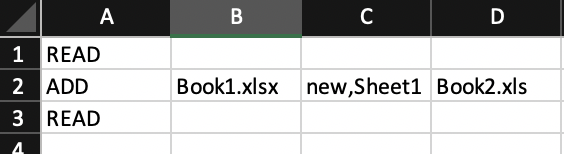
This will add a list of worksheets from once workbook to another
The arguments in different cells are source book followed by source sheets followed by destination book.
| Input | Result |
|---|---|
 |
 |
If the destination book already contains a work sheet with similar name then the sheet getting added will be assigned new name: here in this example Sheet1-1.
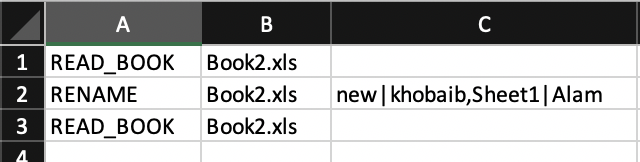
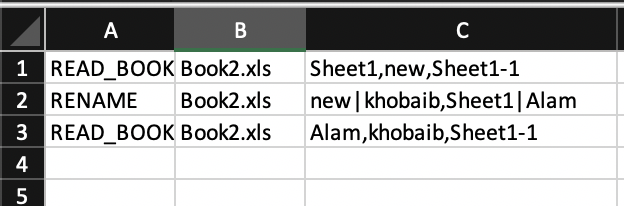
This will rename the worksheets of a workbook.
The arguments in different cells are source book followed by ',' separated sheets with their original name and new name separated by '|'.
| Input | Result |
|---|---|
 |
 |
This will aggregate all the worksheets in the given workbooks.
The arguments in different cells are ',' separated workbook names followed by the aggregated workbook name.
| Input | Result |
|---|---|
 |
 |
This will aggregate the work sheets with similar header into a single worksheet of a workbook.
The arguments in different cells are workbook name followed by the ',' separated sheet names. If sheet names are not provided then all the sheets will be aggregated with similar headers of that work book.
| Input | Result |
|---|---|
 |
 |
Note: This operation works only on simple sheets with simple headers. Having only first row as header without any merge cells. Also the name of the generated sheets can be any unique name. Since the use won't be knowing how many different sheets can be generated because of different headers so specifying arguments is not possbile for new sheet names. Although a list of new sheet names can be given equal to the total number of current sheets and then only some of the first names would be picked up as the new names. But this is not supported yet.
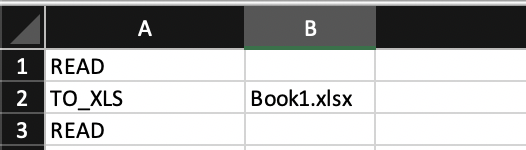
This will convert the provided workbooks from xls/xlsx to xls.
The arguments would be the list of ',' separted workbook names. If no argument is provided all the workbooks will be converted to xls format.
The same workbook is not converted rather a new book is added with same name and xls format.
| Input | Result |
|---|---|
 |
 |
This will convert the provided workbooks from xlsx/xls to xlsx.
The arguments would be the list of ',' separted workbook names. If no argument is provided all the workbooks will be converted to xlsx format.
The same workbook is not converted rather a new book is added with same name and xlsx format.
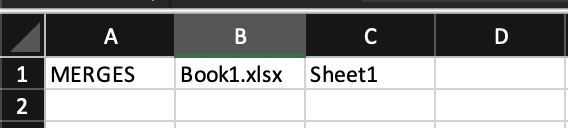
This will give all the merged cell ranges in a worksheet of a workbook as ',' separated list.
The arguments in different cells are workbook name followed by worksheet name.
| Input | Result |
|---|---|
 |
 |
This will convert a list of given worksheets in a workbook to csv format.
The agruments in different cells are WorkBook name followed by the list of ',' separated WorkSheet names to be converated to csv format.
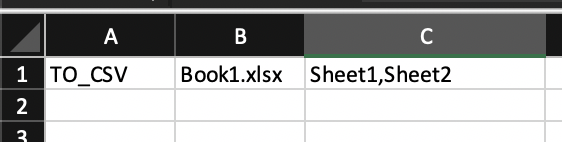
The output will be stored in csvOutputs folder