




This dbt package transforms data from Fivetran's Zuora connector into analytics-ready tables.
- Number of materialized models¹: 51
- Connector documentation
- dbt package documentation
This package enables you to enhance balance transaction entries with useful fields, create customized churn analysis, and develop monthly recurring revenue insights. It creates enriched models with metrics focused on account activity, subscription management, and billing transaction history.
Final output tables are generated in the following target schema:
<your_database>.<connector/schema_name>_zuora
By default, this package materializes the following final tables:
| Table | Description |
|---|---|
| zuora__account_daily_overview | Provides daily account snapshots with invoice counts, amounts, payments, taxes, discounts, refunds, and rolling totals to track account financial health, payment activity, and balance evolution over time. For an example of how this data can be used to evaluate churn at the monthly level, see this analysis query, and see the DECISIONLOG for a more detailed explanation of churn definitions and additonal evaluation grains. Example Analytics Questions:
|
| zuora__account_overview | Consolidates account profiles with comprehensive transaction metrics including invoice counts, amounts, payments, subscriptions, taxes, discounts, refunds, and monthly averages to understand account financial performance and relationships. Example Analytics Questions:
|
| zuora__billing_history | Tracks invoice-level billing history with amounts, payment details, charges, tax, discounts, refunds, credit adjustments, and product/subscription counts to analyze billing patterns, payment status, and revenue recognition timing. Example Analytics Questions:
|
| zuora__line_item_history | Chronicles individual invoice line items with product details, subscription info, charge amounts, discounts, taxes, service periods, and revenue calculations to provide granular visibility into revenue components and product-level billing. Example Analytics Questions:
|
| zuora__monthly_recurring_revenue | Tracks monthly recurring revenue (MRR) and non-MRR by account with gross, discount, and net calculations comparing current to previous month to measure subscription business health, analyze revenue trends, and calculate MRR movement by type. Example Analytics Questions:
|
| zuora__subscription_overview | Provides detailed subscription profiles with activation dates, term lengths, subscription status, auto-renewal settings, charge details including MRR, amendment info, and period calculations to monitor subscription lifecycle and financial contribution. Example Analytics Questions:
|
| zuora__line_item_enhanced | This table is a comprehensive, denormalized analytical table that enables reporting on key revenue, subscription, customer, and product metrics from your billing platform. It's designed to align with the schema of the *__line_item_enhanced table found in Zuora, Recharge, Stripe, Shopify, and Recurly, offering standardized reporting across various billing platforms. To see the kinds of insights this table can generate, explore example visualizations in the Fivetran Billing Model Streamlit App. Visit the app for more details and refer to these docs for how to enable the table, which is disabled by default. |
¹ Each Quickstart transformation job run materializes these models if all components of this data model are enabled. This count includes all staging, intermediate, and final models materialized as view, table, or incremental.
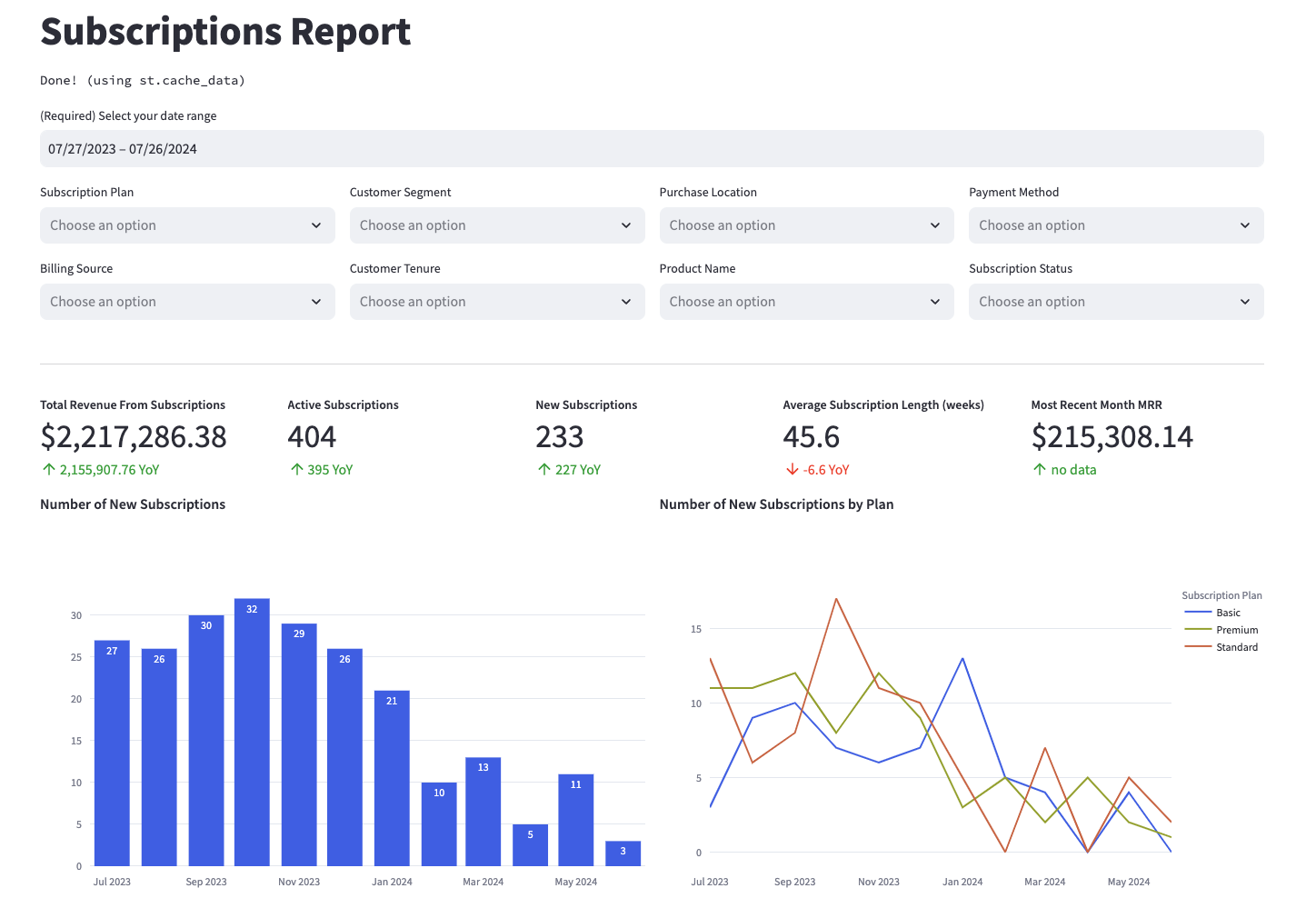
Many of the above reports are now configurable for visualization via Streamlit. Check out some sample reports here.
To use this dbt package, you must have the following:
- At least one Fivetran Zuora connection syncing data into your destination.
- A BigQuery, Snowflake, Redshift, PostgreSQL, or Databricks destination.
You can either add this dbt package in the Fivetran dashboard or import it into your dbt project:
- To add the package in the Fivetran dashboard, follow our Quickstart guide.
- To add the package to your dbt project, follow the setup instructions in the dbt package's README file to use this package.
Include the following zuora package version in your packages.yml file.
TIP: Check dbt Hub for the latest installation instructions or read the dbt docs for more information on installing packages.
packages:
  - package: fivetran/zuora
    version: [">=1.3.0", "<1.4.0"]
All required sources and staging models are now bundled into this transformation package. Do not include
fivetran/zuora_sourcein yourpackages.ymlsince this package has been deprecated.
If you are using a Databricks destination with this package, you will need to add the below (or a variation of the below) dispatch configuration within your dbt_project.yml. This is required for the package to accurately search for macros within the dbt-labs/spark_utils then the dbt-labs/dbt_utils packages, respectively.
dispatch:
  - macro_namespace: dbt_utils
search_order: ['spark_utils', 'dbt_utils']By default, this package runs using your destination and the zuora schema. If this is not where your Zuora data is (for example, if your Zuora schema is named zuora_fivetran), add the following configuration to your root dbt_project.yml file:
vars:
  zuora:
    zuora_database: your_database_name
zuora_schema: your_schema_nameIf you have multiple Zuora connections in Fivetran and would like to use this package on all of them simultaneously, we have provided functionality to do so. For each source table, the package will union all of the data together and pass the unioned table into the transformations. The source_relation column in each model indicates the origin of each record.
To use this functionality, you will need to set the zuora_sources variable in your root dbt_project.yml file:
# dbt_project.yml

vars:
  zuora:
    zuora_sources:
      - database: connection_1_destination_name # Required
        schema: connection_1_schema_name # Required
        name: connection_1_source_name # Required only if following the step in the following subsection

      - database: connection_2_destination_name
        schema: connection_2_schema_name
name: connection_2_source_nameIf you are running the package through Fivetran Transformations for dbt Core™, the below step is necessary in order to synchronize model runs with your Zuora connections. Alternatively, you may choose to run the package through Fivetran Quickstart, which would create separate sets of models for each Zuora source rather than one set of unioned models.
By default, this package defines one single-connection source, called zuora, which will be disabled if you are unioning multiple connections. This means that your DAG will not include your Zuora sources, though the package will run successfully.
To properly incorporate all of your Zuora connections into your project's DAG:
- Define each of your sources in a
.ymlfile in your project. Utilize the following template for thesource-level configurations, and, most importantly, copy and paste the table and column-level definitions from the package'ssrc_zuora.ymlfile.
# a .yml file in your root project

version: 2

sources:
  - name: <name> # ex: Should match name in zuora_sources
    schema: <schema_name>
    database: <database_name>
    loader: fivetran
    config:
      loaded_at_field: _fivetran_synced
    freshness: # feel free to adjust to your liking
      warn_after: {count: 72, period: hour}
      error_after: {count: 168, period: hour}

tables: # copy and paste from zuora/models/staging/src_zuora.yml - see https://support.atlassian.com/bitbucket-cloud/docs/yaml-anchors/ for how to use anchors to only do so onceNote: If there are source tables you do not have (see Disable models for non-existent sources), you may still include them, as long as you have set the right variables to
False.
- Set the
has_defined_sourcesvariable (scoped to thezuorapackage) toTrue, like such:
# dbt_project.yml
vars:
  zuora:
has_defined_sources: trueYour Zuora connection may not sync every table that this package expects. This might be because you are excluding those tables. If you are not using those tables, you can disable the corresponding functionality in the package by specifying the variable in your dbt_project.yml. By default, all packages are assumed to be true. You only have to add variables for tables you want to disable in the following way:
vars:
  zuora__using_credit_balance_adjustment: false # Disable if you do not have the credit balance adjustment table
  zuora__using_refund: false # Disable if you do not have the refund table
  zuora__using_refund_invoice_payment: false # Disable if you do not have the refund invoice payment table
zuora__using_taxation_item: false # Disable if you do not have the taxation item tableZuora allows the functionality for multicurrency to bill customers in various currencies. If you are an account utilizing multicurrency, make sure to set the zuora__using_multicurrency variable to true in dbt_project.yml so the amounts in our data models accurately reflect the home currency values in your native account currency.
vars:
zuora__using_multicurrency: true #Enable if you are utilizing multicurrency, false by default.We were not able to develop the package using the multicurrency variable, so we had to execute our best judgement when building these models. If you encounter any issues with enabling the variable, please file a bug report with us and we can work together to fix any issues you encounter.
Expand to view configurations
This package contains the zuora__line_item_enhanced model which constructs a comprehensive, denormalized analytical table that enables reporting on key revenue, subscription, customer, and product metrics from your billing platform. It's designed to align with the schema of the *__line_item_enhanced model found in Recurly, Recharge, Stripe, Shopify, and Zuora, offering standardized reporting across various billing platforms. To see the kinds of insights this model can generate, explore example visualizations in the Fivetran Billing Model Streamlit App. This model is enabled by default. To disable it, set the zuora__standardized_billing_model_enabled variable to false in your dbt_project.yml:
vars:
zuora__standardized_billing_model_enabled: false # true by default.By default, the zuora__account_daily_overview will aggregate data for the entire date range of your data set based on the minimum and maximum invoice_date values from the invoice source table, and zuora__monthly_recurring_revenue based on the service_start_date from the invoice_item source table.
However, you may limit this date range if desired by defining the following variables for each respective model (the zuora_overview_ variables refer to the zuora__account_daily_overview, the zuora_mrr_ variables apply to zuora__monthly_recurring_revenue).
vars:
    zuora_daily_overview_first_date: "yyyy-mm-dd"
    zuora_daily_overview_last_date: "yyyy-mm-dd"

    zuora_mrr_first_date: "yyyy-mm-dd"
zuora_mrr_last_date: "yyyy-mm-dd"This package includes all source columns defined in the macros folder of this package. You can add more columns using our pass-through column variables. These variables allow the pass-through fields to be aliased (alias) and casted (transform_sql) if desired, but not required. Datatype casting is configured via a SQL snippet within the transform_sql key. You may add the desired SQL while omitting the as field_name at the end and your custom pass-though fields will be casted accordingly. Use the below format for declaring the respective pass-through variables:
vars:
  zuora_account_pass_through_columns:
    - name: "new_custom_field"
      alias: "custom_field"
      transform_sql: "cast(custom_field as string)"
    - name: "another_one"
  zuora_subscription_pass_through_columns:
    - name: "this_field"
      alias: "cool_field_name"
  zuora_rate_plan_pass_through_columns:
    - name: "another_field"
      alias: "cooler_field_name"
  zuora_rate_plan_charge_pass_through_columns:
    - name: "yet_another_field"
alias: "coolest_field_name"By default this package will build the Zuora staging models within a schema titled (<target_schema> + _zuora_source), the Zuora intermediate models within a schema titled (<target_schema> + _zuora_int), and the Zuora final models within a schema titled (<target_schema> + _zuora) in your target database. If this is not where you would like your modeled Zuora data to be written to, add the following configuration to your dbt_project.yml file:
models:
    zuora:
      +schema: my_new_schema_name # Leave +schema: blank to use the default target_schema.
      staging:
+schema: my_new_schema_name # Leave +schema: blank to use the default target_schema.If an individual source table has a different name than the package expects, add the table name as it appears in your destination to the respective variable:
IMPORTANT: See this project's
dbt_project.ymlvariable declarations to see the expected names.
vars:
zuora_<default_source_table_name>_identifier: your_table_name If you do not use the default all-caps naming conventions for Snowflake, you may need to provide the case-sensitive spelling of your source tables that are also Snowflake reserved words.
In this package, this would apply to the ORDER source. If you are receiving errors for this source, include the below identifier in your dbt_project.yml file:
vars:
zuora_order_identifier: "ORDER" # as an example, must include the double-quotes and correct caseExpand to view details
Fivetran offers the ability for you to orchestrate your dbt project through Fivetran Transformations for dbt Core™. Learn how to set up your project for orchestration through Fivetran in our Transformations for dbt Core setup guides.
This dbt package is dependent on the following dbt packages. These dependencies are installed by default within this package. For more information on the following packages, refer to the dbt hub site.
IMPORTANT: If you have any of these dependent packages in your own
packages.ymlfile, we highly recommend that you remove them from your rootpackages.ymlto avoid package version conflicts.
packages:
    - package: fivetran/fivetran_utils
      version: [">=0.4.0", "<0.5.0"]

    - package: dbt-labs/dbt_utils
      version: [">=1.0.0", "<2.0.0"]

    - package: dbt-labs/spark_utils
version: [">=0.3.0", "<0.4.0"]The Fivetran team maintaining this package only maintains the latest version of the package. We highly recommend you stay consistent with the latest version of the package and refer to the CHANGELOG and release notes for more information on changes across versions.
A small team of analytics engineers at Fivetran develops these dbt packages. However, the packages are made better by community contributions.
We highly encourage and welcome contributions to this package. Learn how to contribute to a package in dbt's Contributing to an external dbt package article.
This dbt package takes several opinionated stances in order to provide the customer several options to better understand key subscription metrics. Those include:
- Evaluating a history of billing transactions, examined at either the invoice or invoice item level
- How to calculate monthly recurring revenue and at which grains to assess it, either looking at it granularly at the charge (invoice item) or account monthly level
- Developing a custom churn analysis that you can find in the analysis folder that's built on the account monthly level, but also giving the customer the ability to look at churn from a subscription or rate plan charge level.
If you would like a deeper explanation of the decisions we made to our models in this dbt package, you may reference the DECISIONLOG.
- If you have questions or want to reach out for help, see the GitHub Issue section to find the right avenue of support for you.
- If you would like to provide feedback to the dbt package team at Fivetran or would like to request a new dbt package, fill out our Feedback Form.