
Marabu is a free and open-source music tracker built from Soundbox.
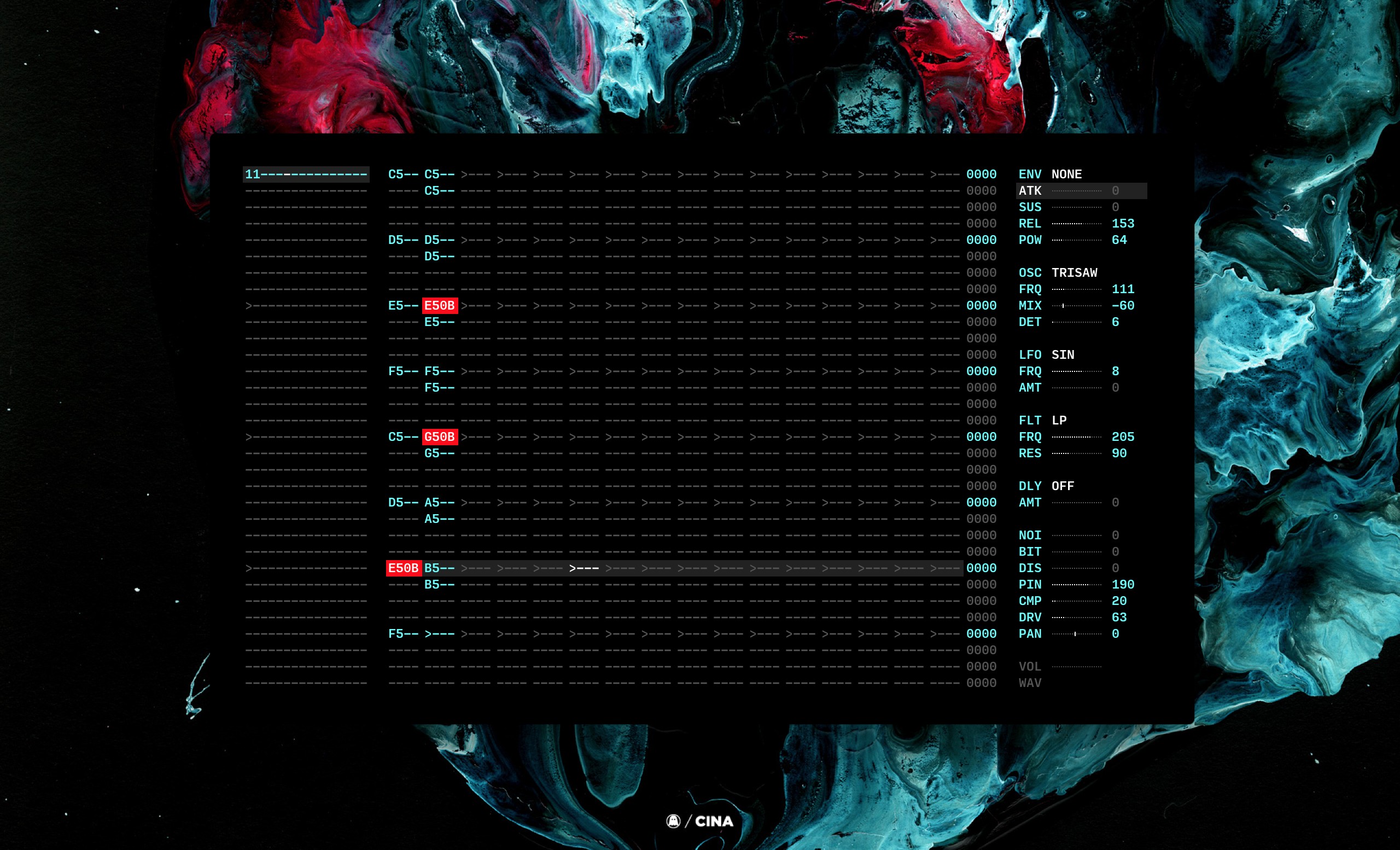
If this is your first time using a tracker, don't worry this quick introduction will cover the basics of writing a little track, and exporting it to an audio file.
The interface is divided into 3 columns, the sequencer, the pattern editor and the instrument. By default, the application launches with an active pattern, in the first instrument. There is a maximum of 16 instruments that can play at the same time.
To move the pattern cursor, use the arrowUp, and arrowDown, keys. Pressing the keyboard keys a,s,d,f,g,h & j will record a note in the first row of the selected row. Pressing the ArrowDown and ArrowUp keys, will move the cursor up/down in the sequencer. Allowing you to fill pattern #1 with notes. Pressing space will play the pattern, pressing esc will stop and pressing del/backspace will erase a note. By default, a new Marabu track has the pattern #1 loaded into the first instrument.
To change the sequencer patterns, use the arrow keys while holding alt. To add notes to a second instrument, move to the second column and press alt ArrowRight, this will set the first row of the second instrument to 1, and allow you to record notes. Press alt ArrowDown to move to the second row, and press alt ArrowRight again twice, to extend the track to 2 rows, and begin adding notes to the second row of the second instrument.
To change the instrument controls, use the arrow keys while holding shift. To save your song, press ctrl s, to render an audio file(.wav) press ctrl r.
spacePlay.escStop.
ctrl nNew.ctrl sSave.ctrl SSave as.ctrl oOpen.ctrl rExport .wav.ctrl iExport .ins(instrument).
alt ArrowDownNext Sequence.alt ArrowUpPrevious Sequence.alt ArrowRightIncrement Pattern Id +1.alt ArrowLeftDecrement Pattern Id -1.>Increment BPM Value +5.<Increment BPM Value -5.
ctrl lLoopmode, see below.
ArrowRightNext Instrument.ArrowLeftPrevious Instrument.ArrowDownNext Row.ArrowUpPrevious Row.
)Increment Note Value +12.(Decrement Note Value -12.0Increment Note Value +1.9Decrement Note Value -1.BackspaceErase Note in Row./Add a Control Keyframe.TabToggle Composition Mode.
shift ArrowDownNext Control.shift ArrowUpPrevious Control.shift ArrowRightIncrement Control Value +1.shift ArrowLeftDecrement Control Value -1.
]Increment Control Value +10.[Decrement Control Value -10.}Increment Control Value +1.{Decrement Control Value -1.xNext Octave.zPrevious Octave.
Hold shift, while pressing a note, to make chords.
aPlay/Record C.sPlay/Record D.dPlay/Record E.fPlay/Record F.gPlay/Record G.hPlay/Record A.jPlay/Record B.wPlay/Record C#.ePlay/Record D#.tPlay/Record F#.yPlay/Record G#.uPlay/Record A#.
ATKAttackSUSSustainRELReleasePOWAttack/Release curve
MOD--MIXDry/Wet between the 2 oscFRQFrequencyDETDetune, frequency offset between the 2 osc.
AMTAmountFRQFrequency
LPLow-passHPHigh-passBPBand-passFRQFilter FrequencyRESResonance
DLYDelay RateVOLDelay Volume
NOINoise VolumeBITBitcrusherDISDistortionPINPinkingCMPCompressorDRVDrivePANPan
VOLUV Volume/EnvelopeWAVUV Wave shape
Press ctrl k to activate cheatmode. Press esc to exit cheatmode.
The cheatmode will catch 3 keys, corresponding to int/hex of rate, length & offset of the selection. The / key indicates that it does not loop through the whole pattern.
4Every 4th note.42Every 4th note, and the following one.422Every 4th note, and the following one, starting from the second./Only the first note./ 44Only the 5th, 6th, 7th and 8th first notes.
cTo copy the entire pattern.vTo paste copied notes.4 cTo copy every 4th note.
8 asThis will add C5 and D5 to the 1st and 9th note.
backspaceTo clear a whole column.4 backspaceTo clear every 4th bar.42 backspaceTo clear every 4th bar, starting at the second bar.
+Increment each note of the pattern.-Decrement each note of the pattern.
To copy the first 16 bars, into the 16 following bars and play the following note.
/ F cCopy the first 16 bars./ F F vPaste the first 16 bars from the the 16th bar.
Press ctrl l to activate loopmode.
enterWill play from current sequencer row, for 1 track./ enterWill play from current sequencer row, only active instrument, for 1 track.4 enterWill play from the current sequencer row, for 4 tracks./ 4 enterWill play from the current sequencer row, only active instrument, for 4 tracks.
cTo copy the selected sequence.vTo insert the selected sequence.backspaceDelete selected sequence.rRender the selected loop.
Install npm, download dependencies and start marabu with:
npm install
npm start
During render, the track time is displayed in the before-last row of the Editor in the 0252 format, or 2:52.