VeCook An enhanced cooking companion built for Kitchen CoPilot. Perfect for anyone seeking guidance to someone(AI) that cares about your health, corrects your mistakes, and understands YOU. With Kitchen CoPilot, cooking feels less like a chore and more like a supportive, enriching experience.
👨🏻💻This project was built during Hackomania 2025 within 24 hours.
📝Option C: Showcase how AI or other technologies can enrich the existing Kitchen Copilot app and further delight the user!
📄Full challenge statement can be found here.
- 🍽 Personalized Meal Planning
- Powered by the Google Fit API, the AI dynamically adjusts recipes and ingredient portions based on your activity level for optimal nutrition.
- Have dietary preferences or allergies? Simply inform the AI chatbot, and it will curate meal recommendations tailored to your need
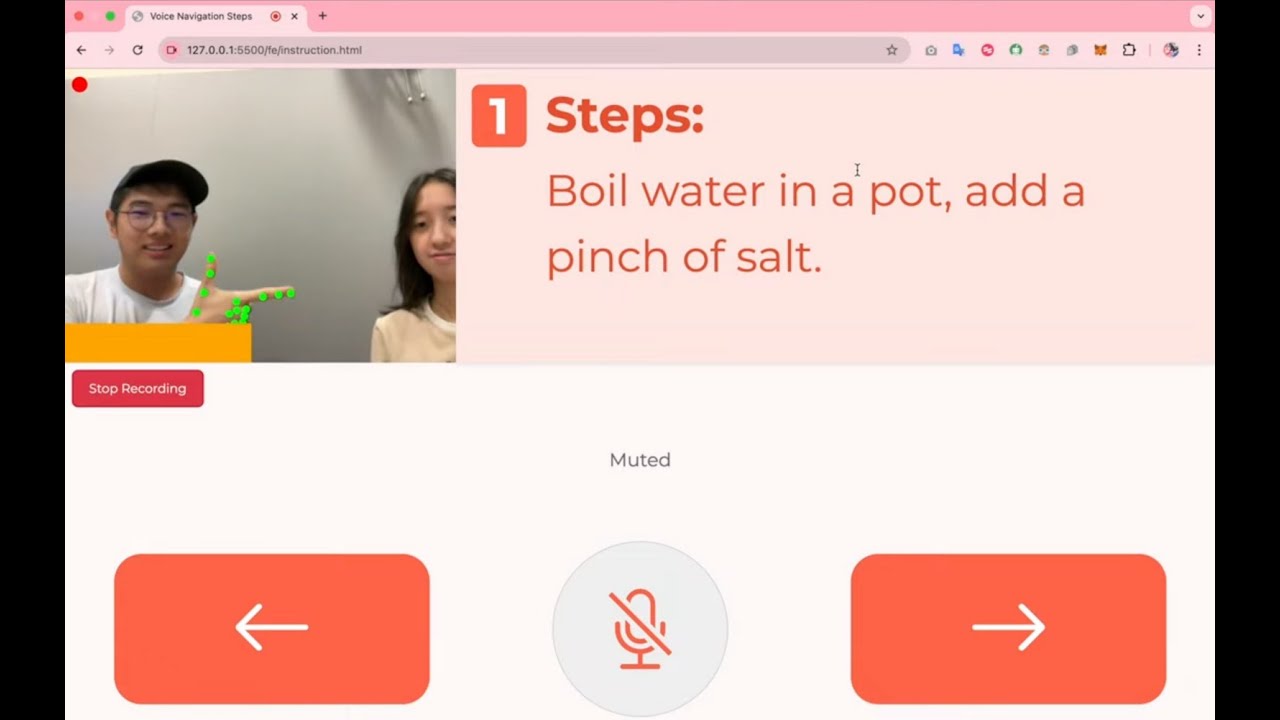
- 🙌 Hands-Free Recipe Book
- Navigate through cooking steps effortlessly using hand gestures-—point right 👉🏻 to move forward and left 👈🏻 to go back
- No more touching screens with messy hands—-cook with ease!
- 🤖 AI-Powered Assistance
- Made a mistake? Just raise your hand✋ and ask the AI for guidance on how to fix it in real-time
- 🎥 Content Creator Friendly:
- Effortlessly record your cooking process and share it on social media to inspire others and showcase your skills!
Frontend:
Backend:
- Flask
- Google Fit API
- OpenAI API
- Python 3.7 or higher
- A modern web browser (Chrome, Firefox, Safari, or Edge)
- OpenAI API key
-
Clone the repository
git clone https://github.com/YOUR_USERNAME/VeCook-fork.git cd VeCook-fork/be -
Install Python dependencies
pip install -r requirements.txt
-
Set up environment variables
Create a
.envfile in thebe/directory with the following:OPENAI_API_KEY=your_openai_api_key_here -
Run the Flask backend
python app.py
The backend server will start on
http://localhost:5000
-
Navigate to the frontend directory
cd ../fe -
Open with a local server
- Using VS Code Live Server extension:
Right-click on
index.htmland select "Open with Live Server"
- Using VS Code Live Server extension:
Right-click on
-
Access the application
Open your browser and navigate to
http://127.0.0.1:5500/fe/if using Live Server extension.
- 🎥 Allow camera access for hand gesture controls
- 🤚 Raise your hand to activate AI assistance
- 👉 Point right to go to the next step
- 👈 Point left to go back to the previous step
- Michelle Chan (@Chelle007) — Backend Web Developer
- Desmond (@desraymondz) — JavaScript and ml5.js Developer
- Fukutaro Sie (@fukutarosie) — UI/UX Designer and Frontend Web Developer
- Daniella Setio (@starryciell) — Frontend Web Developer