Secure your AI models before deployment. Detects malicious code, backdoors, and security vulnerabilities in ML model files.




📖 Full Documentation | 🎯 Usage Examples | 🔍 Supported Formats
Install and scan in 30 seconds:
# Install ModelAudit with all ML framework support
pip install modelaudit[all]

# Scan a model file
modelaudit model.pkl

# Scan a directory
modelaudit ./models/

# Export results for CI/CD
modelaudit model.pkl --format json --output results.json
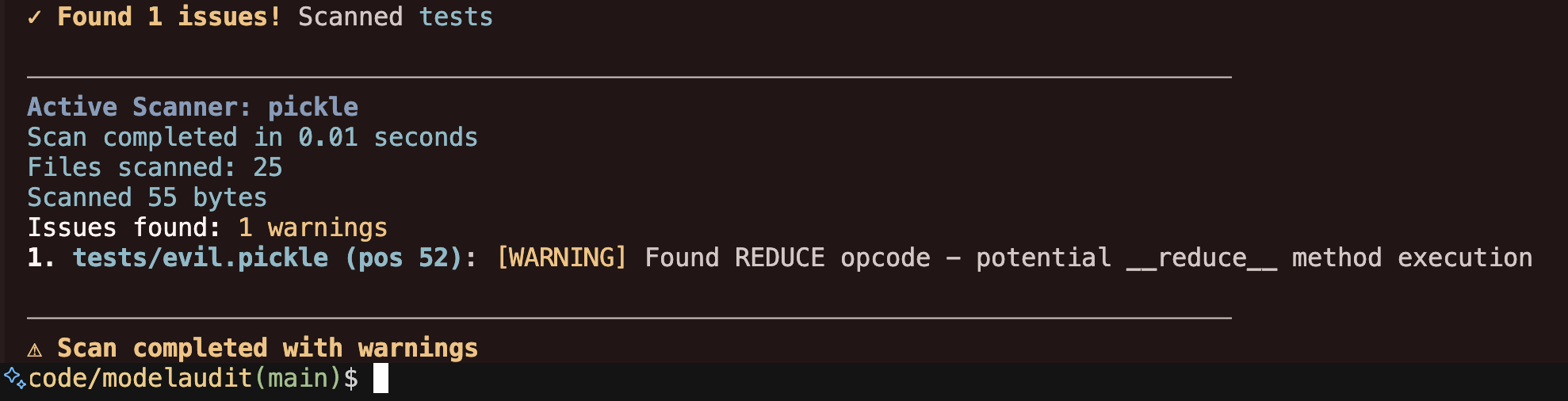
Example output:
$ modelaudit suspicious_model.pkl

✓ Scanning suspicious_model.pkl
Files scanned: 1 | Issues found: 2 critical, 1 warning

1. suspicious_model.pkl (pos 28): [CRITICAL] Malicious code execution attempt
   Why: Contains os.system() call that could run arbitrary commands

2. suspicious_model.pkl (pos 52): [WARNING] Dangerous pickle deserialization
   Why: Could execute code when the model loads

✗ Security issues found - DO NOT deploy this modelStops malicious models that run arbitrary commands when loaded (common in PyTorch .pt files)
Identifies trojaned models with hidden functionality or suspicious weight patterns
Validates model integrity and prevents tampering in your ML pipeline
Checks for license violations that could expose your company to legal risk
Detects API keys, tokens, and other credentials hidden in model weights or metadata
Identifies URLs, IPs, and socket usage that could enable data exfiltration or C2 channels
Detects Hidden JIT/Script Execution
Scans TorchScript, ONNX, and other JIT-compiled code for dangerous operations
ModelAudit includes 29 specialized file format scanners:
| Format | Extensions | Risk Level | Security Focus |
|---|---|---|---|
| Pickle | .pkl, .pickle, .dill |
🔴 HIGH | Code execution, dangerous opcodes |
| PyTorch | .pt, .pth, .ckpt, .bin |
🔴 HIGH | Pickle payloads, embedded malware |
| Joblib | .joblib |
🔴 HIGH | Pickled scikit-learn objects |
| NumPy | .npy, .npz |
🔴 HIGH | Array metadata, pickle objects |
| TensorFlow | .pb, SavedModel directories |
🟠 MEDIUM | PyFunc operations, custom ops |
| Keras | .h5, .hdf5, .keras |
🟠 MEDIUM | Unsafe layers, custom objects |
| ONNX | .onnx |
🟠 MEDIUM | Custom operators, metadata |
| XGBoost | .bst, .model, .ubj |
🟠 MEDIUM | Serialized boosting models |
| SafeTensors | .safetensors |
🟢 LOW | Header validation (recommended) |
| GGUF/GGML | .gguf, .ggml |
🟢 LOW | LLM standard format |
| JAX/Flax | .msgpack, .flax, .orbax, .jax |
🟢 LOW | Msgpack serialization |
| JAX Checkpoint | .ckpt, .checkpoint, .pickle |
🟢 LOW | JAX checkpoint formats |
| TensorFlow Lite | .tflite |
🟢 LOW | Mobile model validation |
| ExecuTorch | .ptl, .pte |
🟢 LOW | PyTorch mobile archives |
| Core ML | .mlmodel |
🟢 LOW | Apple custom layers |
| TensorRT | .engine, .plan |
🟢 LOW | NVIDIA inference engines |
| PaddlePaddle | .pdmodel, .pdiparams |
🟢 LOW | Custom operations |
| OpenVINO | .xml |
🟢 LOW | Intel IR format |
| PMML | .pmml |
🟢 LOW | XML predictive models |
| Format | Extensions | Security Focus |
|---|---|---|
| ZIP | .zip |
Path traversal, malicious files |
| TAR | .tar, .tar.gz, .tgz, .tar.bz2, etc. |
Archive exploits |
| 7-Zip | .7z |
Archive security |
| OCI Layers | .manifest |
Container layer analysis |
| Metadata | .json, .md, .yml, .yaml, .rst |
Embedded secrets, URLs |
| Manifest | .json, .yaml, .xml, .toml, .ini |
Configuration vulnerabilities |
| Text | .txt, .md, .markdown, .rst |
ML-related text analysis |
| Jinja2 Templates | .jinja, .j2, .template |
Template injection (SSTI) |
View complete format documentation →
- Pickle-based formats:
.pkl,.pt,.pth,.ckpt,.joblib,.npy,.npz - NumPy arrays: Pickle objects embedded in array metadata
- Embedded executables: Hidden binaries in model files
- API keys, tokens, and credentials in model weights/metadata
- URLs, IP addresses, and network endpoints
- Suspicious configuration properties
- ZIP archives: Path traversal, malicious files, symlink attacks
- TAR archives: Directory traversal, dangerous extractions
- 7-Zip archives: Compressed archive security validation
- TensorFlow/Keras: Unsafe operations, Lambda layers, custom objects
- ONNX: Custom operators, external data references
- PyTorch TorchScript/JIT: Script execution in serialized models
- Jinja2 templates: Server-side template injection (SSTI)
modelaudit production_model.safetensors --format json --output security_report.jsonModelAudit automatically detects CI environments and adjusts output accordingly:
# Recommended: Use JSON format for machine-readable output
modelaudit models/ --format json --output results.json

# Text output automatically adapts to CI (no spinners, plain text)
modelaudit models/ --timeout 300

# Disable colors explicitly with NO_COLOR environment variable
NO_COLOR=1 modelaudit models/
CI-Friendly Features:
- 🚫 Spinners automatically disabled when output is piped or in CI
- 🎨 Colors disabled when
NO_COLORenvironment variable is set - 📊 JSON output recommended for parsing in CI pipelines
- 🔍 Exit codes: 0 (clean), 1 (issues found), 2 (errors)
# Scan models from HuggingFace, PyTorch Hub, MLflow, JFrog, or cloud storage
modelaudit https://huggingface.co/gpt2
modelaudit https://pytorch.org/hub/pytorch_vision_resnet/
modelaudit models:/MyModel/Production
modelaudit model.dvc
modelaudit s3://my-bucket/downloaded-model.pt

# JFrog Artifactory - now supports both files AND folders
# Auth: export JFROG_API_TOKEN=... (or JFROG_ACCESS_TOKEN)
modelaudit https://company.jfrog.io/artifactory/repo/model.pt
# Or with explicit flag:
modelaudit https://company.jfrog.io/artifactory/repo/model.pt --api-token "$JFROG_API_TOKEN"
modelaudit https://company.jfrog.io/artifactory/repo/models/ # Scan entire folder!modelaudit model_package.zip --sbom compliance_report.json --strict --verboseModelAudit automatically adapts to your input - no configuration needed for most cases:
# Local file - fast scan, no progress bars
modelaudit model.pkl

# Cloud directory - auto enables caching + progress bars
modelaudit s3://my-bucket/models/

# HuggingFace model - selective download + caching
modelaudit hf://microsoft/DialoGPT-medium

# Large local file - enables progress + optimizations
modelaudit 15GB-model.bin

# CI environment - auto detects and uses JSON output
CI=true modelaudit model.pkl
Override smart detection when needed:
# Force strict mode for security-critical scans
modelaudit model.pkl --strict --format json --output report.json

# Override size limits for huge models
modelaudit huge-model.pt --max-size 50GB --timeout 7200

# Preview mode without downloading
modelaudit s3://bucket/model.pt --dry-run
View advanced usage examples →
ModelAudit uses smart detection to automatically configure optimal settings based on your input:
✨ Smart Detection Features:
- Input type (local/cloud/registry) → optimal download & caching strategies
- File size (>1GB) → large model optimizations + progress bars
- Terminal type (TTY/CI) → appropriate UI (progress vs quiet mode)
- Cloud operations → automatic caching, size limits, timeouts
🎛️ Override Controls (13 focused flags):
--strict– scan all file types, strict license validation, fail on warnings--max-size SIZE– unified size limit (e.g.,10GB,500MB)--timeout SECONDS– override auto-detected timeout--dry-run– preview what would be scanned/downloaded--progress– force enable progress reporting--no-cache– disable caching (overrides smart detection)--format json/--output file.json– structured output for CI/CD--sbom file.json– generate CycloneDX v1.6 SBOM with enhanced ML-BOM support--verbose/--quiet– control output detail level--blacklist PATTERN– additional security patterns
🔐 Authentication (via environment variables):
- Set
JFROG_API_TOKENorJFROG_ACCESS_TOKENfor JFrog Artifactory - Set
MLFLOW_TRACKING_URIfor MLflow registry access
ModelAudit automatically optimizes scanning strategies for different model sizes:
- < 100 GB: Full in-memory analysis for comprehensive scanning
- 100 GB - 1 TB: Chunked processing with 50 GB chunks for memory efficiency
- 1 TB - 5 TB: Streaming analysis with intelligent sampling
- > 5 TB: Advanced distributed scanning techniques
Large models are supported with automatic timeout increases and memory-optimized processing.
ModelAudit performs static analysis only. It examines model files for risky patterns without ever loading or executing them. Promptfoo's redteaming module is dynamic—it loads the model (locally or via API) and sends crafted prompts to probe runtime behavior. Use ModelAudit first to verify the model file itself, then run redteaming if you need to test how the model responds when invoked.
Requirements:
- Python 3.10 or higher
- Compatible with Python 3.10, 3.11, 3.12, and 3.13
Basic installation (recommended for most users):
🚀 Just want everything to work?
pip install modelaudit[all]Basic installation:
# Core functionality only (pickle, numpy, archives)
pip install modelaudit
Specific frameworks:
pip install modelaudit[tensorflow]  # TensorFlow (.pb)
pip install modelaudit[pytorch]     # PyTorch (.pt, .pth)
pip install modelaudit[h5]          # Keras (.h5, .keras)
pip install modelaudit[onnx]        # ONNX (.onnx)
pip install modelaudit[safetensors] # SafeTensors (.safetensors)

# Multiple frameworks
pip install modelaudit[tensorflow,pytorch,h5]
Additional features:
pip install modelaudit[coreml]      # Apple Core ML
pip install modelaudit[flax]        # JAX/Flax models
pip install modelaudit[mlflow]      # MLflow registry
pip install modelaudit[huggingface] # Hugging Face integration
Compatibility:
# NumPy 1.x compatibility (some frameworks require NumPy < 2.0)
pip install modelaudit[numpy1]

# For CI/CD environments (omits dependencies like TensorRT that may not be available)
pip install modelaudit[all-ci]
Docker:
docker pull ghcr.io/promptfoo/modelaudit:latest
# Linux/macOS
docker run --rm -v "$(pwd)":/app ghcr.io/promptfoo/modelaudit:latest model.pkl
# Windows
docker run --rm -v "%cd%":/app ghcr.io/promptfoo/modelaudit:latest model.pkl# Scan single file
modelaudit model.pkl
# Scan directory
modelaudit ./models/
# Strict mode (fail on warnings)
modelaudit model.pkl --strict# JSON output for automation
modelaudit models/ --format json --output results.json
# Generate SBOM report
modelaudit model.pkl --sbom compliance_report.json
# Disable colors in CI
NO_COLOR=1 modelaudit models/# Hugging Face models (via direct URL or hf:// scheme)
modelaudit https://huggingface.co/gpt2
modelaudit hf://microsoft/DialoGPT-medium
# Cloud storage
modelaudit s3://bucket/model.pt
modelaudit gs://bucket/models/
modelaudit https://account.blob.core.windows.net/container/model.pt
# MLflow registry
modelaudit models:/MyModel/Production
# JFrog Artifactory (files and folders)
modelaudit https://company.jfrog.io/artifactory/repo/model.pt # Single file
modelaudit https://company.jfrog.io/artifactory/repo/models/ # Entire folder--format- Output format: text, json, sarif--output- Write results to file--verbose- Detailed output--quiet- Minimal output--strict- Fail on warnings, scan all files--timeout- Override scan timeout--max-size- Set size limits (e.g., 10 GB)--dry-run- Preview without scanning--progress- Force progress display--sbom- Generate CycloneDX SBOM--blacklist- Additional patterns to flag--no-cache- Disable result caching--stream- Stream scan: download files one-by-one, scan immediately, then delete to save disk space
For large models or environments with limited disk space, use the --stream flag to minimize storage usage:
# Scan large models without filling disk
modelaudit hf://meta-llama/Llama-3.2-90B --stream

# Works with all sources
modelaudit s3://bucket/large-model.pkl --stream
modelaudit gs://bucket/model/ --stream
modelaudit ./local-models/ --stream
How it works:
- Files are downloaded one at a time (not all at once)
- Each file is scanned immediately after download
- Files are deleted after scanning to free up space
- Ideal for CI/CD pipelines or constrained environments
- Computes SHA256 hash and aggregate content hash for deduplication
$ modelaudit model.pkl

✓ Scanning model.pkl
Files scanned: 1 | Issues found: 1 critical

1. model.pkl (pos 28): [CRITICAL] Malicious code execution attempt
   Why: Contains os.system() call that could run arbitrary commands
modelaudit model.pkl --format json{
"files_scanned": 1,
"issues": [
{
"message": "Malicious code execution attempt",
"severity": "critical",
"location": "model.pkl (pos 28)"
}
]
}modelaudit model.pkl --format sarif --output results.sarifmodelaudit doctor --show-failed# Use NumPy 1.x compatibility mode
pip install modelaudit[numpy1]# ModelAudit shows exactly what to install
modelaudit your-model.onnx
# Output: "Install with 'pip install modelaudit[onnx]'"0- No security issues found1- Security issues detected2- Scan errors occurred
ModelAudit uses environment variables for authenticating to remote services:
# JFrog Artifactory
export JFROG_API_TOKEN=your_token

# MLflow
export MLFLOW_TRACKING_URI=http://localhost:5000

# AWS, Google Cloud, and Azure
# Authentication is handled automatically by the respective client libraries
# (e.g., via IAM roles, `aws configure`, `gcloud auth login`, or environment variables).
# For specific env var setup, refer to the library's documentation.
export AWS_ACCESS_KEY_ID=your_access_key
export AWS_SECRET_ACCESS_KEY=your_secret_key
export GOOGLE_APPLICATION_CREDENTIALS=/path/to/service-account.json

# Hugging Face
export HF_TOKEN=your_token- Documentation: promptfoo.dev/docs/model-audit/
- Usage Examples: promptfoo.dev/docs/model-audit/usage/
- Report Issues: Contact support at promptfoo.dev
This project is licensed under the MIT License - see the LICENSE file for details.