









A QGIS plugin for tree monitoring using AI.
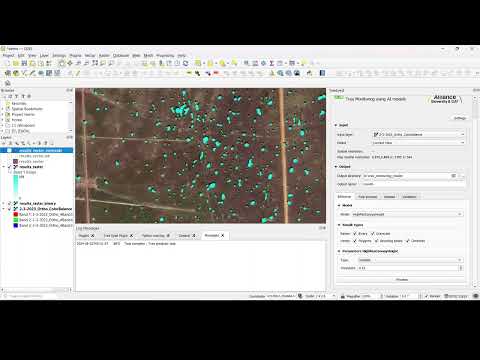
This plugins seeks to integrate existing and custom AI models for tree monitoring (semantic segmentation, instance segmentation, and object detection) in high resolution RGB imagery (meters per pixel).
Apart from the model handling this plugin facilitates the integration with QGIS layers for image extraction and post-processing. Additional features for dataset creation and validation in COCO format are available.
Available models:
| Model | Source | Preferred spatial resolution | Computer Vision Task | Model exported in ONNX format |
|---|---|---|---|---|
| HighResCanopyHeight | https://github.com/facebookresearch/HighResCanopyHeight | 1 m | Pixel-wise Regression | link |
| Mask R-CNN | Custom trained | 4.77 m | Instance Segmentation | link |
| Deepforest | https://github.com/weecology/DeepForest | less than 0.5 m | Object Detection | link |
| VHRTrees | https://github.com/RSandAI/VHRTrees | 0.5 m | Object Detection | link |
TreeEyed plugin is now available directly in the QGIS Python Plugins Repository and can be installed using the plugin manager in QGIS.

⚠️ Important: You must restart QGIS after installing plugin dependencies for the changes to take effect.
You need to install the QGIS environment with the required dependencies:
conda env create -f environment-qgis.yml
conda activate tree_eyed_qgis
qgis
And then install the plugin from the repository.

⚠️ Note: After downloading the models, set the correct path for Models Directory in the TreeEyed Settings menu.
Documentantion and tutorials are available here.
This plugin works on QGIS, and it was tested on Windows 11 using QGIS 3.40.0-Bratislava.
It requires additional python packages that can be installed by using the plugin and following the installation instructions:
- opencv-python
- onnxruntime-gpu
- pycocotools
- gdown
A dependencies folder with the required packages will be added in the plugin root folder.
If you encounter issues while using the TreeEyed plugin, consider the following steps:
- Plugin not loading: Ensure you are using a compatible QGIS version.
- Missing dependencies: Check that all required Python packages are installed. Use the plugin's installation instructions to install missing packages.
- Model loading errors: Verify that the ONNX model files are correctly downloaded and placed in the expected directories.
- Image processing issues: Confirm that your input imagery matches the required spatial resolution for the selected model.
- General errors: Review the QGIS Python Console for error messages and consult the documentation for further guidance.
For unresolved issues, please open an issue on the GitHub repository with detailed information about your problem.
To use TreeEyed functionality in CLI mode you need to create a python environment using:
conda env create -f environment.yml
conda activate tree_eyed
To use GPU processing, make sure cuda and cudnn DLLs are installed in the systen or install the following dependencies:
conda activate tree_eyed
conda install conda-forge::cudnn
conda install conda-forge::libcufft
conda install conda-forge::cuda-cudart
Additionally, you need to have the models in a local folder an a configuration file, for example a minimal configuration file example_config.json is:
{
	"model": "HighResCanopyHeight"
	, "model_dir": "path/to/models"
	, "output_path": "path/to/output/folder"
	, "prefix": "output_name"
	, "input_raster_path": "path/to/input/raster"
	, "task": "inference"
	, "raster_outputs": ["grayscale"]
	, "vector_outputs": []
}
To execute the inference call tree_eyed_app.py, for example:
python src/tree_eyed/tree_eyed_app.py --config example_config.json
You can also use TreeEyed as a docker container. First build the docker image:
docker build -t treeeyed-image .
Run the container interactively:
docker run --gpus all -v <path-to-local-workspace-folder>:/app/data -v <path-to-local-models-folder>:/app/models -it treeeyed-image
Execute inference:
conda activate tree_eyed
python src/tree_eyed/tree_eyed_app.py --config /app/data/example_config.json
- Migration to ONNX format and ONNX runtime for all models
- Reduced dependencies installation, improved installation feedback
- Added VHRTrees Model
- Added Custom ONNX model
- Added h_mean, h_min and h_max columns when using HighResCanopyHeight for vector output
- Improved layers visualization using Viridis color palette
- Automatic tiling (tiling, processing, merging)
- Cache System
- Update GUI and look-and-feel, improved GUI options
- Added "Simple Inference" QGIS processing algorithm
- Improved processing architecture (interface, processor, tree_eyed_processor)
- Added CLI using
tree_eyed_app.py - Added docker support using
Dockerfile - Support for non tif images
- Additional postprocessing steps (non-max supression)
- Migration rasterio to gdal
- Migration geopandas to gdal
- Improved export to COCO dataset
Planned improvements for TreeEyed include:
- Worflow for Human-in-the-loop inference correction, merging, non-max suppression, dataset export.
- Analsys export.
- Integration of additional AI models for tree monitoring.
- Support for state-of-the-art models such as DinoV3.
- Tree zonification features for spatial analysis.
- Tree changes analysis.
- Carbon stock estimation tools.
Stay updated with progress and new features in the documentation and on the GitHub repository.
This project is licensed under the Apache License 2.0 - see the LICENSE file for details.
We welcome contributions from the community! If you would like to contribute to TreeEyed, please follow these steps:
- Fork the repository and create your branch from
experimentalv0.2. - Make your changes and ensure code quality and documentation.
- Submit a pull request with a clear description of your changes.
For major changes, please open an issue first to discuss your proposed modifications.
TODO
See the CONTRIBUTING.md file for detailed contribution guidelines.
This work is being carried out as part of the CGIAR Initiatives and Funded Projects. CGIAR is a global research partnership for a food-secure future. Its science is carried out by 15 Research Centers in close collaboration with hundreds of partners across the globe.
TreeEyed is an open source project, and we welcome contributions and feedback from the community.
We would like to extend our gratitude to the developers and maintainers of the libraries and models integrated into this plugin:

Tropical Forages Progam
Alliance Bioversity International & CIAT
A. F. Ruiz-Hurtado, J. P. Bolaños, D. A. Arrechea-Castillo, and J. A. Cardoso, ‘TreeEyed: A QGIS plugin for tree monitoring in silvopastoral systems using state of the art AI models’, SoftwareX, vol. 29, p. 102071, Feb. 2025, doi: 10.1016/j.softx.2025.102071.
Citation (Bibtex format):
@article{ruiz-hurtadoTreeEyedQGISPlugin2025,
  title = {{{TreeEyed}}: {{A QGIS}} Plugin for Tree Monitoring in Silvopastoral Systems Using State of the Art {{AI}} Models},
  author = {{Ruiz-Hurtado}, Andres Felipe and Bola{\~n}os, Juliana Perez and {Arrechea-Castillo}, Darwin Alexis and Cardoso, Juan Andres},
  year = {2025},
  month = feb,
  journal = {SoftwareX},
  volume = {29},
  pages = {102071},
  issn = {2352-7110},
  doi = {10.1016/j.softx.2025.102071},
  keywords = {Computer vision,Deep learning,QGIS,Remote sensing,Silvopastoral systems,Tree monitoring},
}