Symbolic Geometric Algebra/Calculus package for SymPy.



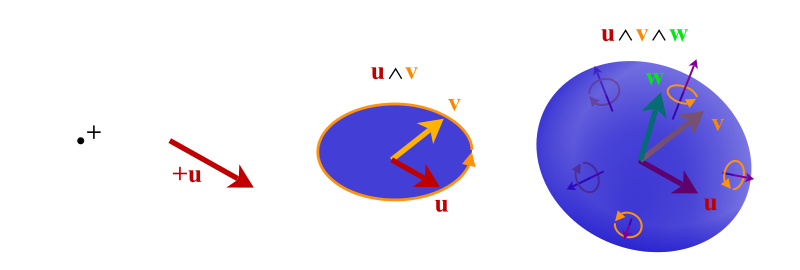



brombo/galgebra was originally written by Alan Bromborsky, but is no longer actively maintained.
pygae/galgebra is a community fork, maintained by Pythonic Geometric Algebra Enthusiasts.
The fork supports Python 3, increases test coverage, set up CI and linters, maintains releases to PyPI, improves docs and has many bug fixes, see Changelog.
- Arbitrary Vector Basis and Metric
- Scalar, Vector, Bivector, Multivector, Pseudoscalar, Spinor, Blade
- Basic Geometic Algebra Operations
- Sum Difference
- Geometric Product
- Outer and Inner Products
- Left and Right Contractions
- Reverse, Dual, Exponential
- Commutator
- Projection, Reflection, Rotation
- Reciprocal Frames
- Inspecting Base/Blade Representation
- Symbolic Manipulations
expand,factor,simplify,subs,trigsimpetc.
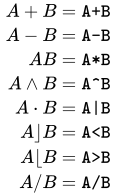
Overloaded Python operators for basic GA operations:
- Geometric Derivative
- Submanifolds
- Linear Transformations
- Differential Operators
The various derivatives of a multivector function is accomplished by multiplying the gradient operator vector with the function:
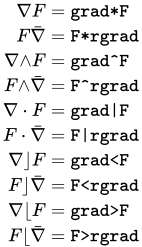
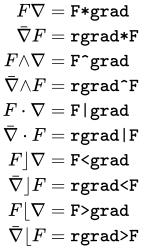
Tip: an example for getting grad and rgrad of a 3-d Euclidean geometric algebra in rectangular coordinates:
from sympy import symbols
from galgebra.ga import Ga

o3d = Ga('e', g=[1,1,1], coords=symbols('x,y,z',real=True))
(grad,rgrad) = o3d.grads()- Enhanced Console Printing
- Latex Printing
- out-of-the-box support for Jupyter Notebook
- PDF generation and croping support if you have
pdflatex/pdfcropinstalled
After installing GAlgebra (see section Installing GAlgebra below), in a Jupyter Notebook:
from sympy import symbols
from galgebra.ga import Ga

from galgebra.printer import Format
Format(Fmode = False, Dmode = True)

st4coords = (t,x,y,z) = symbols('t x y z', real=True)
st4 = Ga('e',
         g=[1,-1,-1,-1],
         coords=st4coords)

M = st4.mv('M','mv',f = True)

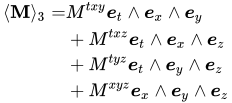
M.grade(3).Fmt(3,r'\langle \mathbf{M} \rangle _3')
You will see:
You may also check out more examples here.
For detailed documentation, please visit https://galgebra.readthedocs.io/ .
NOTE: If you are coming from sympy.galgebra or brombo/galgebra, please check out section Migration Guide below.
Note:
GAlgebra only supports SymPy 1.3 and below for now, see the tracking issue #31.
Please run the following to freeze the version of SymPy to 1.3:
pip install sympy==1.3If you need to use SymPy 1.4 and above for other libraries, please create a seperate virtual environment with SymPy 1.3 for GAlgebra using conda or pyenv-virtualenv.
pip install galgebraThen you are all set!
To install from the latest source code of GAlgebra:
git clone https://github.com/pygae/galgebra.git
cd galgebra
pip install -e .
Note that the optional -e argument is used here for a developer install so modifying the source will take effect immediately without the need of reinstallation.
Now you may run tests to verify the installation, run from the root of the repository:
pip install pytest
pytest test
Further, to run the complete test suite including the ones using nbval, just run:
pip install nbval
pytest --nbval examples/ipython/ test --current-env --sanitize-with test/.nbval_sanitize.cfg
This could take more than 10 minutes, please be patient.
Migrating from sympy.galgebra
GAlgebra is no longer part of SymPy since 1.0.0, if you have an import like this in your source:
from sympy.galgebra.ga import *Simply remove the sympy. prefix before galgebra then you are good to go:
from galgebra.ga import *Migrating from brombo/galgebra
The setgapth.py way to install is now deprecated by pip install galgebra and all modules in GAlgebra should be imported from galgebra, for example:
from galgebra.printer import Format, Eprint, Get_Program, latex, GaPrinter
from galgebra.ga import Ga, one, zero
from galgebra.mv import Mv, NgaNote that in the doc/books directory there are:
BookGA.pdfwhich is a collection of notes on Geometric Algebra and Calculus based of "Geometric Algebra for Physicists" by Doran and Lasenby and on some papers by Lasenby and Hestenes.galgebra.pdfwhich is the original main doc of GAlgebra in PDF format, while the math part is still valid, the part describing the installation and usage of GAlgebra is outdated, please read with cautious or visit https://galgebra.readthedocs.io/ instead.Macdonaldwhich constains bundled supplementary materials for Linear and Geometric Algebra and Vector and Geometric Calculus by Alan Macdonald, see here and here for more information.