Important
This resource is barebones and is intended to be used with an existing implementation of an abilities system or as the base of one.
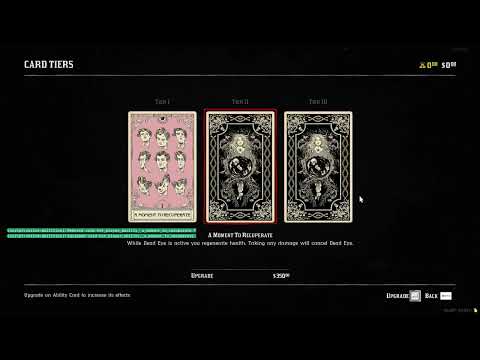
Native Abilities is a RedM resource that provides a fully native implementation of the abilities UI for Red Dead Redemption 2 multiplayer servers. This resource allows developers to create custom abilities systems using the game's original abilities interface, complete with all the visual elements players expect from the authentic Red Dead experience.
Unlike traditional web-based or custom UI implementations, Native Abilities leverages the game's built-in interface systems to provide seamless integration with the player's existing UI experience.
You can click below to watch a short demonstration of Native Satchel.
If you're missing functionality or have ideas for new features that would improve Native Abilities, please don't hesitate to open an issue. Feature requests from the community are always welcome, and feedback about use cases and requirements helps shape the direction of this project!
This resource is provided free of charge and represents countless hours of development work. Like most RedM resources, it builds upon the game's existing functionality rather than being created from scratch - the underlying native functionality belongs to Rockstar Games.
While the RedM community is fantastic and there's certainly a space for paid resources, there's unfortunately a trend of knowledge being gatekept behind paywalls, making important development knowledge harder to access for the community.
For Server Owners: You're absolutely welcome to use Native Abilities on your servers without any restrictions beyond the license terms.
For Resource Developers: If you want to use this as a base for your own projects or distribute modified versions, please pay close attention to the license requirements. As stated in the GNU GPL v3 license, any distributed modifications must be shared under the same open source license. This ensures that improvements benefit the entire community rather than being locked behind paywalls.
The goal is to foster collaboration and shared knowledge, not to enable profiteering from freely contributed work. This is simply a request for license compliance - since the code is open source and properly licensed, you are free to do with it what the license permits. Ultimately, everyone should strive to make the whole of RedM a better place for all players and developers.
Native Abilities is licensed under the GNU GPL v3.
The Native Abilities system is built around several main data types that define how ability cards, loadouts, and player progression are structured. Understanding these types is essential for implementing a custom abilities system.
local card = {
    -- Required: Unique identifier for the ability card
    id = "net_player_ability__paint_it_black",

    -- Required: Category this card belongs to (deadeye, recovery, combat, defense)
    category = "deadeye",

    -- Required: Minimum rank required to purchase/unlock this card
    rank = 2,

    -- Optional: Custom label text (uses labelHash if not provided)
    label = "Paint it Black",

    -- Required: Hash for the card's display name from game text files
    labelHash = "ABILITY_CARD_PAINT_IT_BLACK",

    -- Required: Texture dictionary containing the card's icon
    txd = "ability_cards_set_a",

    -- Required: Texture name for the card's icon
    texture = "ability_card_paint_it_black",

    -- Required: Array of tier progression data
    tiers = {
        {
            -- XP required to upgrade TO this tier (nil for final tier)
            xp = 2500,

            -- Cash cost to upgrade to this tier
            cash = 10000,

            -- Hash for tier description from game text files
            descriptionHash = "ABILITY_CARD_PAINT_IT_BLACK_TIER_ONE_DESC"
        },
        -- ... additional tiers
    }
}local loadout = {
-- Active slot (deadeye cards only)
active_slot = "net_player_ability__paint_it_black",
-- Passive slots (recovery, combat, defense cards)
passive_slot_1 = "net_player_ability__strange_medicine",
passive_slot_2 = "net_player_ability__eye_for_an_eye",
passive_slot_3 = "net_player_ability__cold_blooded"
}local inventoryItem = {
-- Required: Matches ability card ID
id = "net_player_ability__paint_it_black",
-- Required: Whether player owns this card
owned = true,
-- Required: Current tier (1-3)
tier = 2,
-- Required: Current XP progress toward next tier
xp = 5000
}local slot = {
-- Required: Unique identifier for the slot
id = "active_slot",
-- Optional: Custom title (uses titleHash if not provided)
title = "Active Ability",
-- Required: Hash for slot title from game text files
titleHash = "NET_PLAYER_ABILITY_ACTIVE_SLOT_TITLE",
-- Required: Minimum rank to unlock this slot
rank = 0
}Triggers are client-side events that allow you to control the abilities system behavior and manage data programmatically. These events provide the core functionality for opening/closing the UI, synchronizing player data, and performing card management operations.
-- Open the abilities UI
TriggerEvent("native_abilities:open_abilities")

-- Close the abilities UI
TriggerEvent("native_abilities:close_abilities")-- Synchronize player's current loadout
local loadout = {
active_slot = "net_player_ability__paint_it_black",
passive_slot_1 = "net_player_ability__strange_medicine",
passive_slot_2 = nil, -- Empty slot
passive_slot_3 = nil
}
TriggerEvent("native_abilities:synchronize_loadout", loadout)
-- Synchronize player's card inventory
local inventory = {
{
id = "net_player_ability__paint_it_black",
owned = true,
tier = 3,
xp = 15000
},
{
id = "net_player_ability__strange_medicine",
owned = true,
tier = 1,
xp = 800
}
-- ... additional cards
}
TriggerEvent("native_abilities:synchronize_inventory", inventory)-- Programmatically equip a card to a specific slot
TriggerEvent("native_abilities:equip_card", "net_player_ability__paint_it_black", "active_slot")
-- Remove a card from a specific slot
TriggerEvent("native_abilities:remove_card", "passive_slot_1")Events are fired automatically by the Native Abilities system when specific actions occur. You can listen to these events to implement custom logic, such as saving changes, logging player actions, or triggering server-side operations when players interact with the abilities system.
-- Fired when the abilities UI is opened
AddEventHandler("native_abilities:abilities_opened", function()
    print("Player opened abilities menu")
    -- Log UI access, check permissions, etc.
end)

-- Fired when the abilities UI is closed
AddEventHandler("native_abilities:abilities_closed", function()
    print("Player closed abilities menu")
    -- Save any pending changes, update server state, etc.
end)-- Fired when a player equips an ability card
AddEventHandler("native_abilities:card_equipped", function(cardId, slotId)
print("Player equipped " .. cardId .. " to " .. slotId)
-- Update server database, apply card effects, etc.
end)
-- Fired when a player removes an ability card
AddEventHandler("native_abilities:card_removed", function(cardId, slotId)
print("Player removed " .. cardId .. " from " .. slotId)
-- Update server database, remove card effects, etc.
end)
-- Fired when a player purchases an ability card
AddEventHandler("native_abilities:card_purchased", function(cardId)
print("Player purchased " .. cardId)
-- Deduct currency, update inventory, etc.
end)
-- Fired when a player upgrades an ability card
AddEventHandler("native_abilities:card_upgraded", function(cardId, newTier)
print("Player upgraded " .. cardId .. " to tier " .. newTier)
-- Deduct XP/currency, update card tier, etc.
end)-- Server-side example: Save loadout changes to database
AddEventHandler("native_abilities:card_equipped", function(cardId, slotId)
local playerId = source
-- Update player's loadout in database
MySQL.update("UPDATE player_loadouts SET ? = ? WHERE player_id = ?", {
slotId, cardId, playerId
})
-- Apply card effects to player
ApplyAbilityCardEffects(playerId, cardId)
end)
-- Server-side example: Handle card purchases
AddEventHandler("native_abilities:card_purchased", function(cardId)
local playerId = source
-- Find card configuration
local cardData = GetCardConfig(cardId)
if not cardData then return end
-- Check if player has enough money
local playerMoney = GetPlayerMoney(playerId)
local cardCost = cardData.tiers[1].cash
if playerMoney >= cardCost then
-- Deduct money and add card to inventory
RemovePlayerMoney(playerId, cardCost)
AddCardToInventory(playerId, cardId, 1, 0) -- tier 1, 0 XP
-- Sync updated inventory back to client
local inventory = GetPlayerCardInventory(playerId)
TriggerClientEvent("native_abilities:synchronize_inventory", playerId, inventory)
else
-- Not enough money - you could show an error message
TriggerClientEvent("chat:addMessage", playerId, {
color = { 255, 0, 0 },
multiline = true,
args = { "System", "Insufficient funds to purchase ability card!" }
})
end
end)Native Abilities is built using a clean modular architecture that promotes maintainability and extensibility. The system is organized into focused modules with clear responsibilities:
abilities.lua- Main entry point, UI event processing, and external integrationconfig.lua- Ability card data, categories, and system configurationplayer-state.lua- Player progression, loadout, and inventory managementutils.lua- Utility functions and helper methodscard-logic.lua- Business logic for card operations and validationsui-databinding.lua- UI data binding and state synchronizationcard-renderer.lua- UI rendering and visual updatesevent-handlers.lua- User interaction processing and event handling
dataview.lua- Low-level memory operations and data structures
The architecture uses dependency injection to manage module relationships, ensuring clean separation of concerns while maintaining high cohesion within each module. This design enables easy testing, maintenance, and future enhancements while providing a comprehensive event system for server integration.
This project builds upon the hard work and research of many talented individuals in the RedM community. Their contributions made this native abilities implementation possible:
- alloc8or's Native DB
- femga's RDR3 Discoveries
- gottfriedleibniz's Data View implementation
- MagnarRDC's Support
Thank you for considering contributing to Native Abilities! Please note that this project is released with a Contributor Covenant Code of Conduct. By participating in any way in this project, you agree to abide by its terms.
Before contributing, please take a moment to read the Contribution Guide to understand the development process and how to contribute.
