"A System Specialist tool designed to automate code compliance, enforce security policies, and generate service documentation."
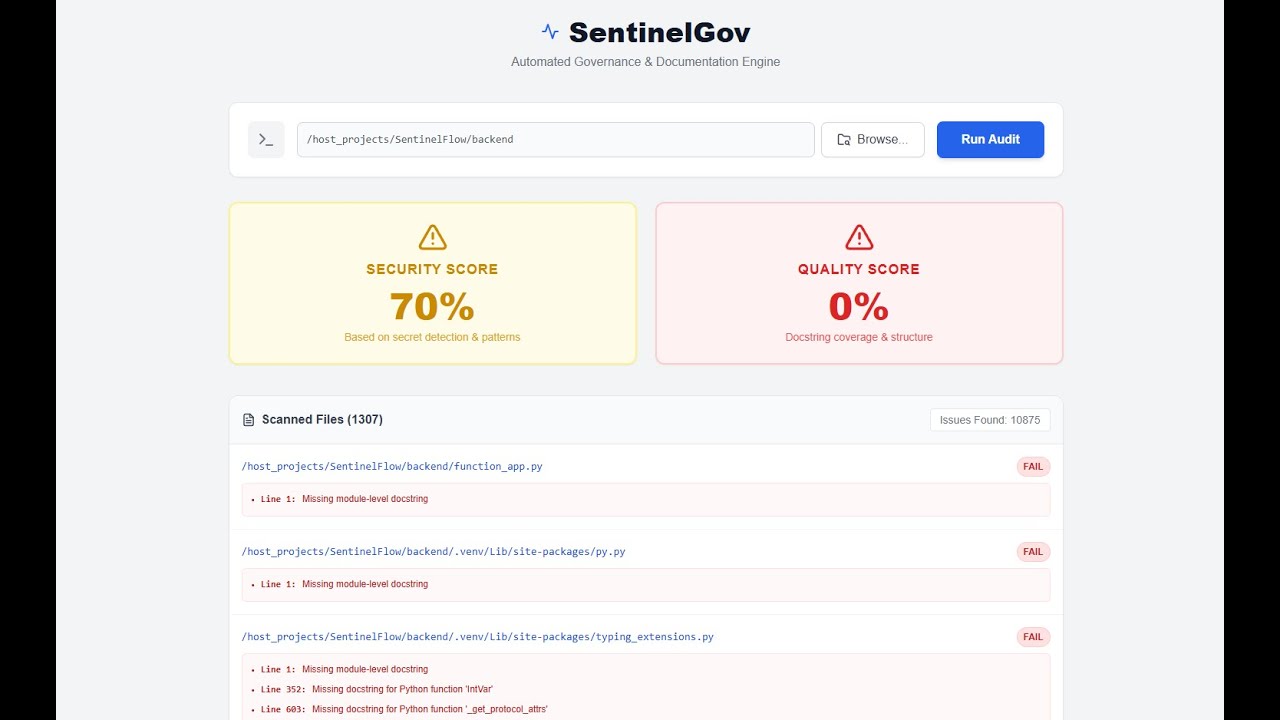
📺 Watch the Architectural Walkthrough featuring core functionalities.


This project was built to demonstrate the capabilities required for a System Specialist involved in automating manual workflows.
| Project Requirement | SentinelGov Solution |
|---|---|
| "Documentation Techniques" | Auto-generates Markdown service documentation from code structure. |
| "Improving Processes" | Replaces manual code reviews with automated compliance scoring (0-100%). |
| "Data-Oriented Mindset" | Treats codebase as data, analyzing AST (Abstract Syntax Trees) and metrics. |
| "System Specialist" | Full-stack architecture (Python/React) containerized with Docker for consistent ops. |
- Polyglot Auditing:
- Python: Deep AST analysis (Function/Module Docstrings).
- JavaScript/TypeScript: Heuristic analysis for comments and structure.
- Terraform: Infrastructure-as-Code validation (Description checks).
- Security: Universal Regex scanning for hardcoded secrets (API Keys, Passwords).
- Dynamic Repository Selection: Browse and audit any project on the host machine via a secure web-based file picker.
- Executive Dashboard: A React-based UI that visualizes "Pass/Fail" metrics for non-technical stakeholders.
- 100% Containerized: One-click deployment using Docker Compose.
graph TD
    subgraph "Client Layer (Frontend)"
        User[System Specialist] -->|Selects Folder| UI["React Dashboard (Vite)"]
        UI -->|REST API Call| Client[TypeScript API Client]
    end

    subgraph "Dockerized Environment (Microservices)"

        Client -->|"POST /scan"| API["FastAPI Backend (Python 3.9)"]

        API -->|Orchestrates| Controller[Core Logic]

        subgraph "Governance Engine"
            Controller -->|"1. Scans"| Scanner[Directory Scanner]
            Controller -->|"2. Routes"| Analyzer[Polyglot Analyzer]

            Analyzer -->|Strategy| AST[Python AST Parser]
            Analyzer -->|Strategy| Regex[Universal Secret Detection]
            Analyzer -->|Strategy| Heuristic["JS/Terraform Checks"]
        end
    end

    subgraph "Host Infrastructure"
        Scanner -->|"Reads (Volume Mount)"| FileSys["Host File System (/host_projects)"]
        FileSys -- Raw Content --> Analyzer
    end

    Analyzer -- Audit Results --> API
    API -- JSON Report --> UI
The system follows a microservices pattern:
- Backend (
/backend): Python FastAPI service. Usesastandregexstrategies to parse files. - Frontend (
/frontend): React + Vite + TypeScript. Visualizes JSON reports via a responsive UI. - Infrastructure:
- Docker: Multi-stage builds for optimized images.
- Nginx: Serves the frontend static assets.
- Make: Automates the developer experience.
Prerequisites: Docker Desktop must be installed and running.
We use a Makefile to standardize operations.
make startThis command builds the images, sets up networking, and launches the containers.
- Dashboard: [http://localhost:5173]
- API Documentation: [http://localhost:8000/docs]
- Open the Dashboard.
- Click "Browse...".
- Navigate to your target folder.
- Note: To see your Windows/Mac projects, navigate UP to root
/and selecthost_projects.
- Click "Select This Folder" -> "Run Audit".
SentinelGov maintains high code quality standards with a comprehensive test suite.
make test
- Backend: ~95% Coverage (Pytest + Cov). Covers API routes, AST logic, and file system mocks.
- Frontend: 100% Pass Rate (Vitest). Validates UI rendering and Error states.
sentinel-gov/
├── backend/                # Python FastAPI Service
│   ├── core/               # Business Logic (Analyzer, Scanner)
│   ├── api/                # REST Endpoints
│   ├── models/             # Pydantic Schemas
│   └── tests/              # Pytest Suite
├── frontend/               # React TypeScript App
│   ├── src/
│   │   ├── components/     # UI Widgets (AuditCard, FolderPicker)
│   │   └── api/            # Typed Fetch Client
│   └── Dockerfile          # Multi-stage Build (Node -> Nginx)
├── docker-compose.yml      # Orchestration
├── Makefile                # Automation Commands
└── README.md               # Documentation
- CI/CD Integration: Run
sentinel-govas a GitHub Action to block PRs with low scores. - Slack Notifications: Webhook integration to alert teams of security violations.
- PDF Export: Use WeasyPrint to download the report as a formal PDF.
Built by Nahasat Nibir.