Open
Conversation


Contributor
|
Hi @NukeGH05T, thanks for creating this project! I'm happy to see that the CLI was useful enough that someone wanted to write a UI front-end for it. Rather than bring a pre-built binary into the project, we'd be very happy to link to an open source version of your assist tool and generated binaries, so that FidelityFX-CLI users can check it out and choose to use it. Would you be happy open sourcing the tool so that we can do that, and collaborate that way? |
Author
|
Hello @rys , I'm quite new to using github's features. Wasn't sure how to approach this so, I made a new public repo and uploaded the source files there. |

|
Hello,
|
This file contains hidden or bidirectional Unicode text that may be interpreted or compiled differently than what appears below. To review, open the file in an editor that reveals hidden Unicode characters.
Learn more about bidirectional Unicode characters
Sign up for free
to join this conversation on GitHub.
Already have an account?
Sign in to comment
3 participants


Add this suggestion to a batch that can be applied as a single commit.This suggestion is invalid because no changes were made to the code.Suggestions cannot be applied while the pull request is closed.Suggestions cannot be applied while viewing a subset of changes.Only one suggestion per line can be applied in a batch.Add this suggestion to a batch that can be applied as a single commit.Applying suggestions on deleted lines is not supported.You must change the existing code in this line in order to create a valid suggestion.Outdated suggestions cannot be applied.This suggestion has been applied or marked resolved.Suggestions cannot be applied from pending reviews.Suggestions cannot be applied on multi-line comments.Suggestions cannot be applied while the pull request is queued to merge.Suggestion cannot be applied right now. Please check back later.
##GUI Assistance
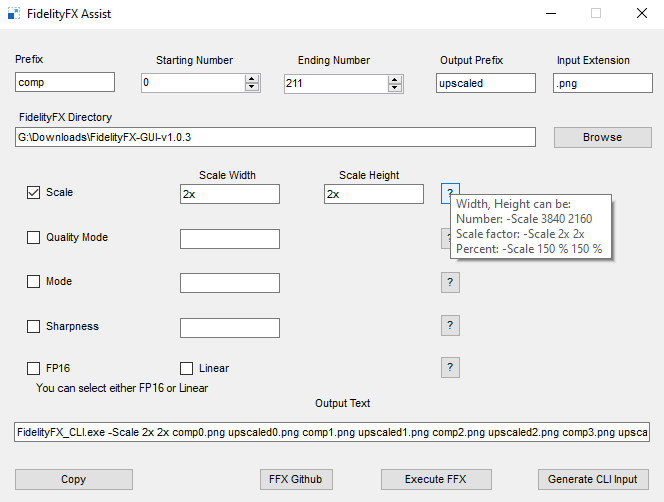
Prefix: The prefix or word before the number sequence starts.
Starting Number: number of first image after prefix
Ending Number: number of last image after prefix
Output Prefix: the prefix all the output images will have
Input Extension: aka image type
Supported Formats: BMP, PNG, ICO, JPG, TIF, GIF
For example, to upscale two images which are
render0.pngandrender1.pngand get output asups0.pngandups1.pngthese are the settings required:Prefix:
renderStarting Number:
0Ending Number:
1Output Prefix:
upsInput Extension:
.pngProtip: Use absolute or relative directories in both prefix fields to get input and store output in different folder.
Does not create folders automatically. Only use existing folders.