A lightweight and secure clipboard manager built with Tauri and Rust.
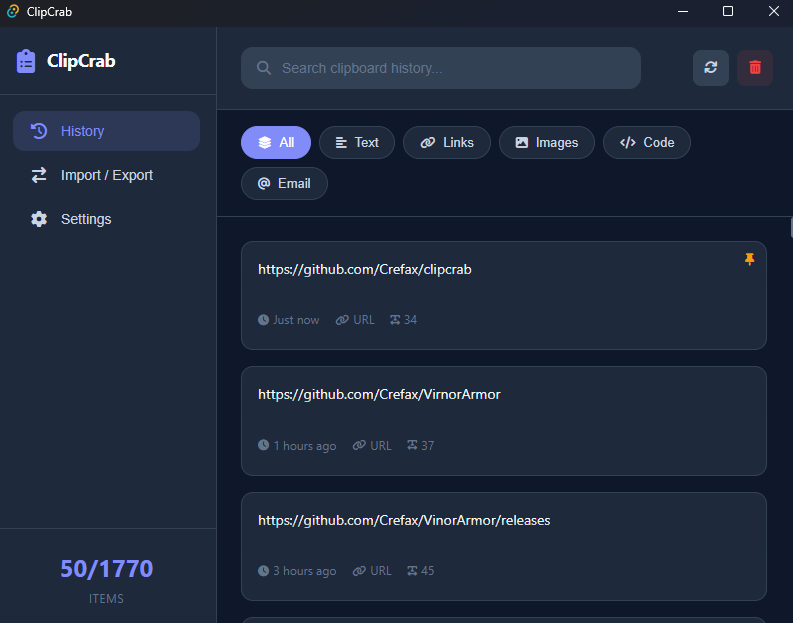
- 📋 Clipboard History - Automatically saves everything you copy
- 🔍 Search - Quickly find items in your history
- 📌 Pin Items - Keep important items at the top
- 🔄 Auto-start - Launch with your system
- 🔐 Encrypted Storage - All data is encrypted at rest
ClipCrab takes your privacy seriously. All clipboard data is encrypted before being stored on disk.
- Algorithm: AES-256-GCM (Advanced Encryption Standard with Galois/Counter Mode)
- Key Size: 256-bit
- Nonce: 12-byte random nonce for each encryption
- Key Storage: A unique encryption key is automatically generated and stored locally on first launch
- Encoding: Encrypted data is Base64 encoded for safe storage
AES-256-GCM provides both confidentiality and authenticity, ensuring your clipboard data cannot be read or tampered with without the encryption key.
Your data is stored locally in:
- Windows:
%LOCALAPPDATA%\clipcrab\ - macOS:
~/Library/Application Support/clipcrab/ - Linux:
~/.local/share/clipcrab/
Download the latest release from the Releases page.
- Download
.msior.exeinstaller
- Debian/Ubuntu: Download
.debfile - Fedora/RHEL: Download
.rpmfile - Other distros: Download
.AppImage(universal, no install needed)
For Linux, you may need to install these dependencies:
# Debian/Ubuntu
sudo apt install libwebkit2gtk-4.1-0 libappindicator3-1

# Fedora
sudo dnf install webkit2gtk4.1 libappindicator-gtk3# Install Rust
curl --proto '=https' --tlsv1.2 -sSf https://sh.rustup.rs | sh
# Clone and build
git clone https://github.com/crefax/clipcrab.git
cd clipcrab
npm install
npm run tauri build- Backend: Rust + Tauri 2.0
- Frontend: HTML, CSS, JavaScript
- Database: SQLite (encrypted)
- Encryption: aes-gcm crate
MIT