Stop losing work in browser tabs. MashAI keeps all your AI tools organized in one desktop app.




Use ChatGPT for writing, Claude for analysis, Gemini for research - all in one desktop app. Separate work and personal with profiles. Built-in ad blocking keeps you focused. And it's fast, even with 20+ conversations open.
Free, open-source, and built for people who use AI to get work done.
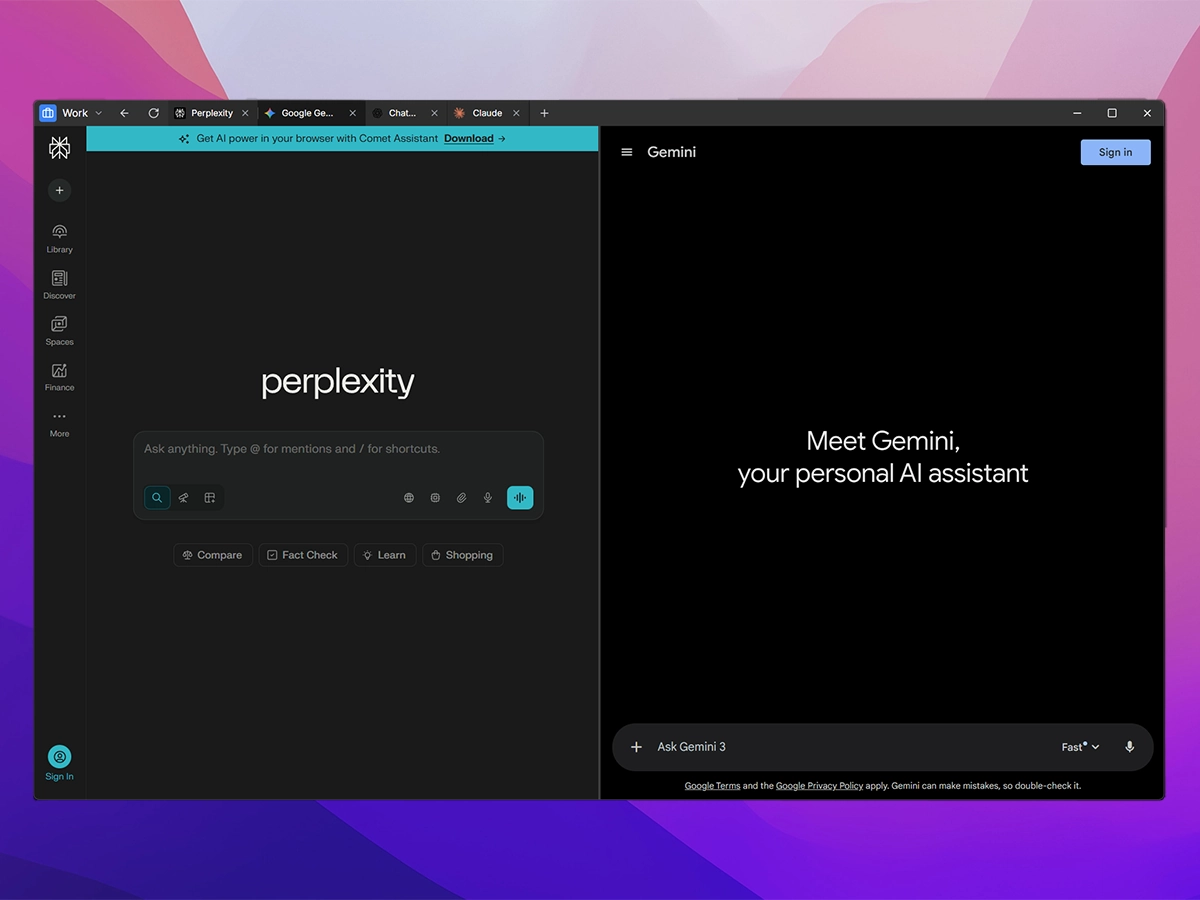
Keep work organized - Separate client projects, research, and personal conversations into profiles. Never lose an important AI chat again.
Stay productive - No more browser tab chaos. No more "which tab was that in?" Just open MashAI and get to work.
Work without distractions - Ad blocking built-in. Privacy-first. Your AI conversations stay on your computer, not sold to advertisers.
Access all major AI assistants from one window:
- ChatGPT – OpenAI's conversational AI
- Claude – Anthropic's helpful assistant
- Gemini – Google's AI assistant
- Perplexity – AI-powered search
- Grok – xAI's real-time AI
- DeepSeek – Advanced reasoning AI
- Custom Providers – Add any web-based AI service
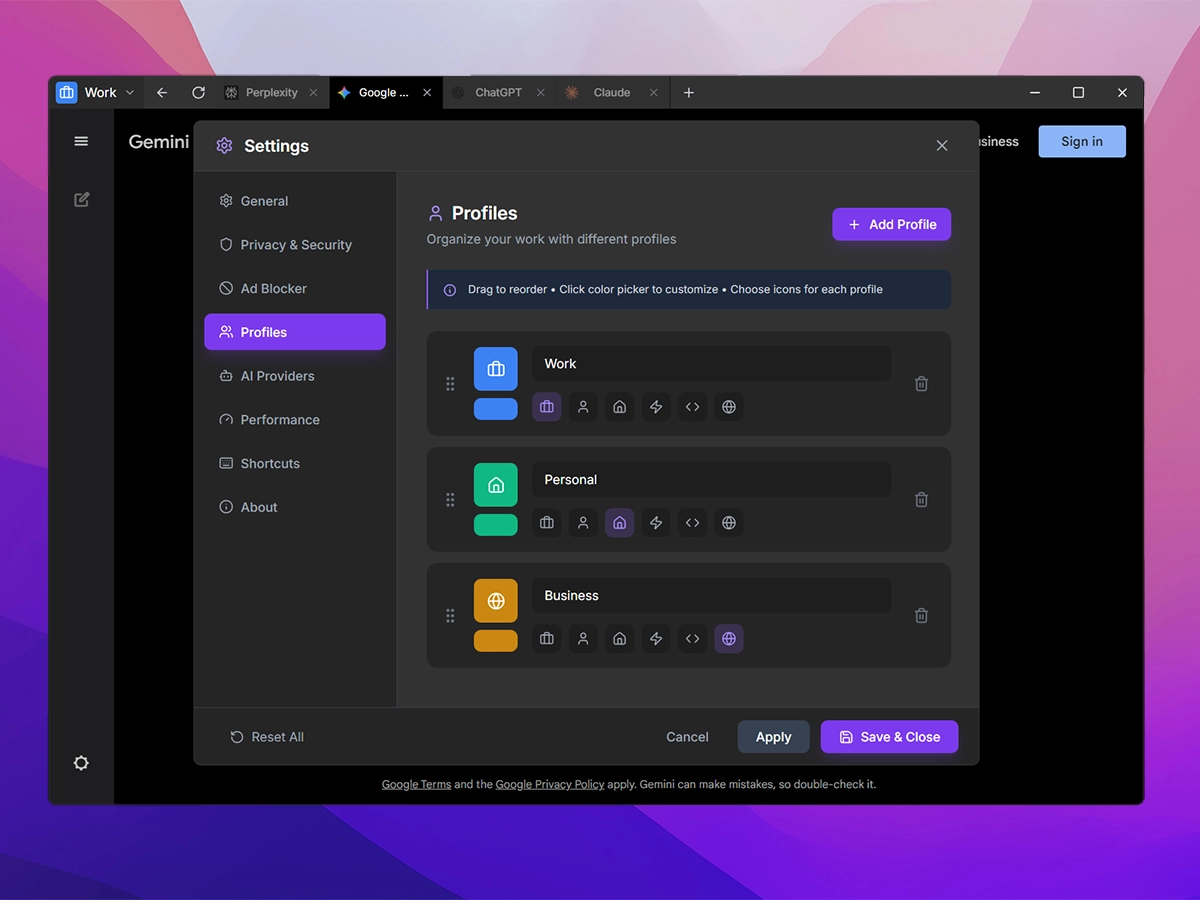
Organize your AI workflows by context:
- Create unlimited profiles (Work, Personal, Research, etc.)
- Each profile maintains its own tab sessions and cookies
- Custom icons and colors for quick identification
- Automatic session persistence per profile
- Complete data cleanup on profile deletion
Browser-like experience with power-user features:
- Drag-and-drop tab reordering
- Duplicate, reload, and reopen closed tabs
- Close tabs to the right / close other tabs
- Real-time favicon caching
- Right-click context menu with rich options
- Tab navigation history (child tabs return to parent)
Work with two AI assistants simultaneously:
- Pin any tab to left or right side panel
- Draggable divider to resize panels
- Swap panel sides with one click
- Visual indicator for pinned tabs in tab bar
- Persists across sessions
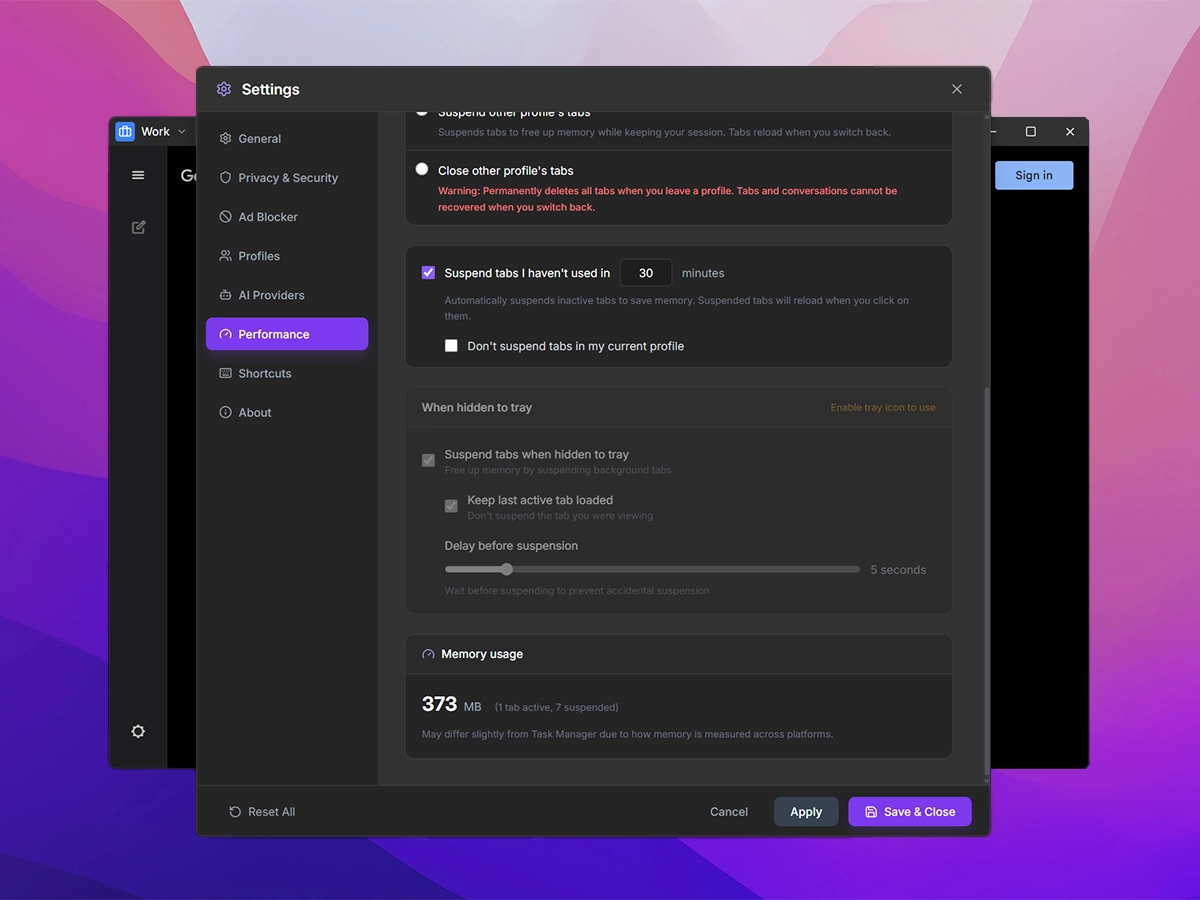
Intelligent memory management inspired by Chrome's Memory Saver:
- Auto-suspend inactive tabs after configurable timeout (1-120 minutes)
- Media-aware protection – Tabs playing audio/video are never suspended
- Manual exclusion – Right-click any tab → "Never Suspend This Tab"
- Profile exclusion – Option to protect all tabs in current profile
- Suspended tabs reload instantly when clicked
Fast navigation and command palette:
- Ctrl+K to open anywhere
- Search across all open tabs
- Switch to any tab instantly
- Search the web directly
- Floating interface accessible anywhere
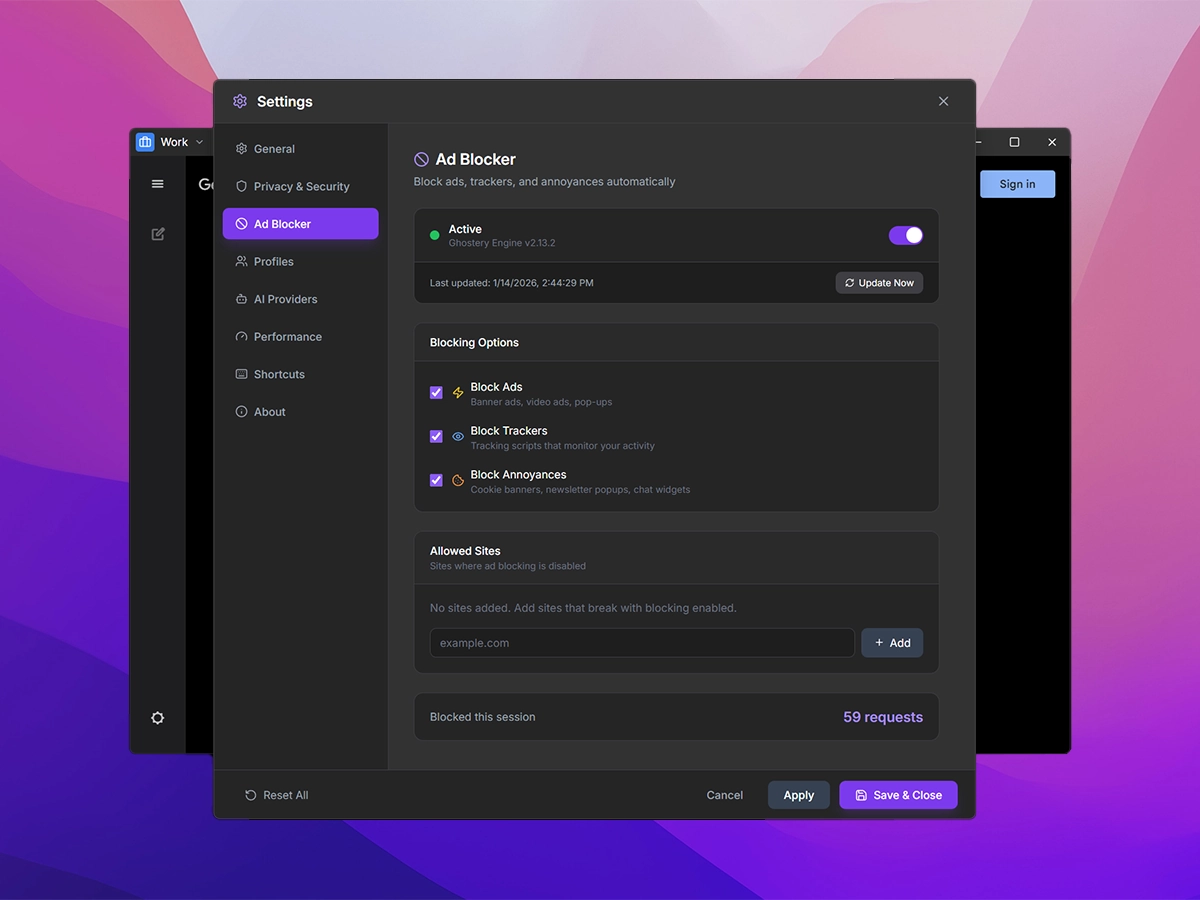
Privacy-first browsing powered by Ghostery's adblocker:
- Blocks ads, trackers, and analytics automatically
- Per-tab blocked request counter
- Cosmetic filtering for cleaner pages
- Toggle on/off from settings
- Whitelist specific sites
Stay productive without slowing down your system:
- Lazy Loading – Only load tabs when needed
- Startup Options – Load all tabs, active profile only, or last active tab
- Profile Switch Behavior – Choose to keep, suspend, or close tabs when switching
- Tray Optimization – Suspend tabs when minimized to tray
- Hardware Acceleration – Toggle on/off based on your system
- Smart Cleanup – Instantly removes orphaned data on startup
Native desktop experience:
- System Tray – Minimize to tray, quick access menu
- Global Shortcuts – Toggle visibility from anywhere (customizable)
- Session Persistence – Tabs and window position/size reliably restored
- Launch at Startup – Start with your system
- Always-on-Top – Keep MashAI visible over other windows
Built-in download handling:
- View and manage downloads
- Toast notifications for completed downloads
- Configurable download location
- Open file or folder from manager
Clean, focused interface:
- Dark theme with violet accent colors
- Custom frameless window with native controls
- Responsive tab bar with dynamic drag regions
- Native context menus
- Comprehensive settings panel
Features planned for future releases:
- Bring Your Own Keys – Use your own API keys for direct API access
- Local AI Support – Integration with Ollama, LM Studio, and other local LLM runners
- Unified Chat Interface – Single interface for all AI providers via API
- Node.js 18.x or higher
- npm 9.x or higher
# Clone the repository
git clone https://github.com/Avaxerrr/MashAI.git
cd MashAI

# Install dependencies
npm install

# Start development server
npm run dev# Build for current platform
npm run build:electron
# Build for specific platform
npm run build:win # Windows (NSIS installer + portable)
npm run build:mac # macOS (DMG + ZIP)
npm run build:linux # Linux (AppImage + deb)The built application will be available in the release directory.
MashAI stores its configuration in your user data directory:
- Windows:
%APPDATA%/mash-ai/ - macOS:
~/Library/Application Support/mash-ai/ - Linux:
~/.config/mash-ai/
| Category | Options |
|---|---|
| General | Hardware acceleration, launch at startup, always-on-top, tray behavior |
| Profiles | Create/edit/delete profiles, custom icons and colors |
| AI Providers | Add/remove/reorder AI services, set default provider |
| Performance | Tab loading strategy, auto-suspend timeout, profile switch behavior |
| Shortcuts | Customize all keyboard shortcuts |
| Privacy | Ad blocking toggle, download settings |
| Shortcut | Action |
|---|---|
Ctrl+T |
New tab |
Ctrl+W |
Close tab |
Ctrl+Tab |
Next tab |
Ctrl+Shift+Tab |
Previous tab |
Ctrl+R |
Reload active tab |
Ctrl+Shift+T |
Reopen closed tab |
Ctrl+J |
Open downloads |
Ctrl+K |
Quick Search |
Ctrl+Shift+A |
Toggle always-on-top |
All shortcuts are customizable in Settings → Shortcuts
| Technology | Purpose |
|---|---|
| Electron 39 | Cross-platform desktop framework |
| React 18 | UI component library |
| TypeScript | Type-safe JavaScript |
| Vite | Fast development and build tool |
| Tailwind CSS | Utility-first styling |
| Ghostery Adblocker | Privacy protection |
- Modular Main Process – Separated managers for tabs, profiles, settings, sessions, tray, and menus
- TypeScript Throughout – Full type safety in both main and renderer processes
- IPC Communication – Clean separation between main and renderer processes
- Session Persistence – Automatic save/restore of tabs and window state
- Favicon Caching – Pre-fetched and cached as base64 for instant display
MashAI/
├── electron/              # Electron main process (TypeScript)
│   ├── main.ts            # Application entry point
│   ├── preload.ts         # Preload script for IPC
│   ├── TabManager.ts      # Tab lifecycle management
│   ├── ProfileManager.ts
│   ├── SettingsManager.ts
│   ├── SessionManager.ts
│   ├── MenuBuilder.ts
│   ├── TrayManager.ts
│   ├── AdBlockManager.ts
│   ├── DownloadManager.ts
│   └── ipc/               # IPC handlers by domain
├── src/                   # React renderer process (TypeScript)
│   ├── App.tsx            # Main application component
│   ├── components/        # UI components
│   │   ├── TitleBar.tsx
│   │   └── settings/      # Settings tab components
│   └── index.css          # Global styles (Tailwind)
├── tools/                 # Build utilities
│   └── png_to_icns.py     # macOS icon generator
└── dist/                  # Production build output
We welcome contributions! Here's how you can help:
- Fork the repository
- Create a feature branch (
git checkout -b feature/amazing-feature) - Commit your changes (
git commit -m 'Add amazing feature') - Push to the branch (
git push origin feature/amazing-feature) - Open a Pull Request
Please read FEATURES.md for the complete feature list and project goals.
Found a bug? Have a feature request? Please open an issue on GitHub.
| Platform | Status |
|---|---|
| Windows 10/11 | ✅ Supported |
| macOS | Coming Soon |
| Linux | Coming Soon |
This project is licensed under the Mozilla Public License 2.0 - see the LICENSE file for details.
- Built with Electron
- UI powered by React and Tailwind CSS
- Icons by Lucide
- Ad blocking by Ghostery
Made with care for AI enthusiasts