前端性能分析 - Performance API(采集篇) #1

Description

前端性能分析采集
一般前端关注的几个点、白屏时间、domReady时间、onLoad时间,直接进入主题Performance Timing API
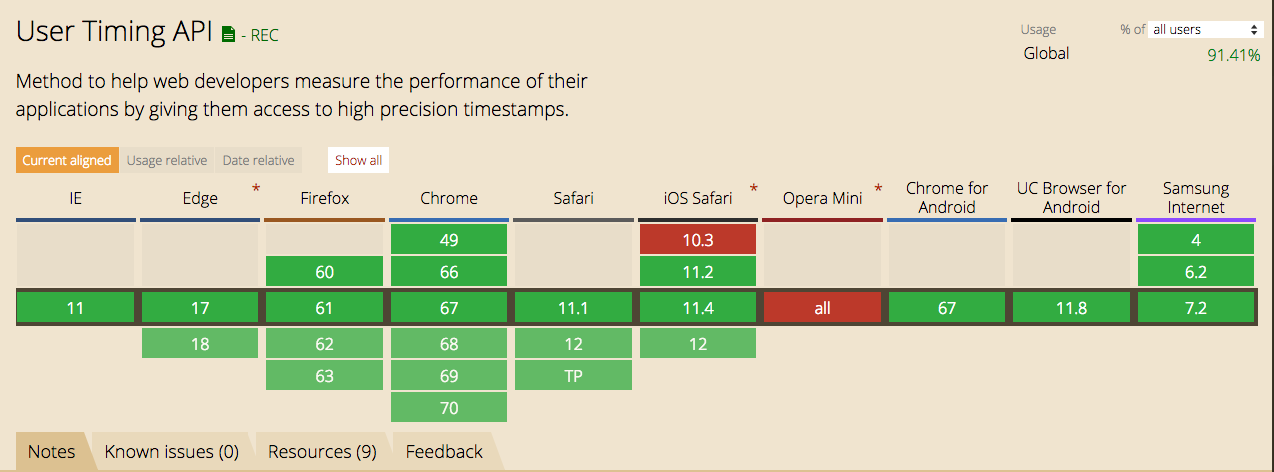
浏览器支持情况
浏览器不支持,再好的API都是白费,直接上图数据来源CanIuse:
Performance Timing API
在浏览器中输入以下代码:
console.log(performance.timing)
会看到N多的API直接上图,解释下API的各个阶段情况:
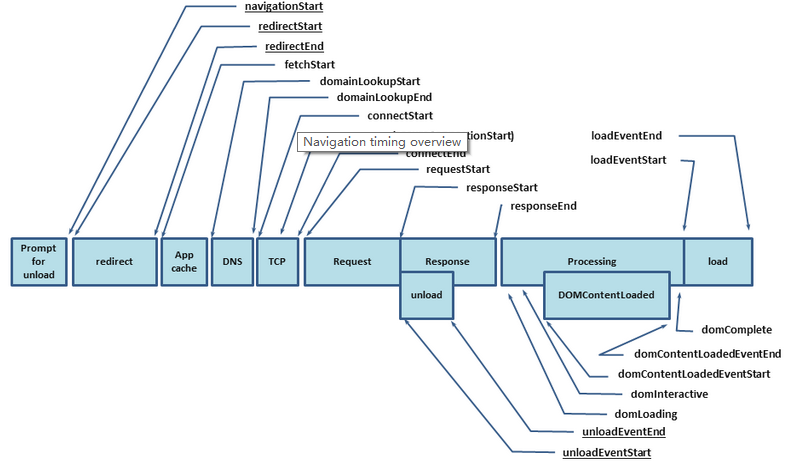
各个字段的含义见文档(或参考资料中获),从W3C文档中可以得出结论如下:
- DNS查询耗时: domainLookupEnd - domainLookupStart
- TCP链接耗时: connectEnd - connectStart
- request请求耗时: responseEnd - requestStart
- 解析dom树耗时: domComplete - domInteractive
- 资源加载时间: domComplete - navigationStart
- 白屏时间: domLoading - navigationStart
- domReady时间: domContentLoadedEventEnd - navigationStart
- onLoad时间: loadEventEnd - fetchStart
结合以上的说明计算公式可以写出一个大致的数据采集的JS如下:
class JSReport {
  constructor() {
    this.timing = performance.timing
  }

  send() {
    const { domainLookupEnd, domainLookupStart, connectEnd, connectStart,
      responseEnd, requestStart, domComplete, domInteractive, domLoading,
      navigationStart, domContentLoadedEventEnd, loadEventEnd, fetchStart } = this.timing
    return {
      DNS: domainLookupEnd - domainLookupStart,
      TCP: connectEnd - connectStart,
      Request: responseEnd - requestStart,
      Source: domComplete - navigationStart,
      DomAnalyze: domComplete - domInteractive,
      UserWaiting: domLoading - navigationStart,
      DomReady: domContentLoadedEventEnd - navigationStart,
      onLoad: loadEventEnd - fetchStart
    }
  }
}
得到上述的只能大致的找出页面的整体性能的数据,怎么找出具体是那些资源导致这个加载?就得用到performance.getEntries方法
该方法会生成对应页面请求的所有的静态资源列表。
部分字段展示:
initiatorType: '资源来源 link|script|css引入'
name: '资源地址'
nextHopProtocol: '协议类型',
duration: '请求时间ms'
transferSize: '文件传输大小'
... 等等
接着上面的js扩展如下:
class JSReport {
  constructor() {
    this.timing = performance.timing
  }

  send() {
    const { domainLookupEnd, domainLookupStart, connectEnd, connectStart,
      responseEnd, requestStart, domComplete, domInteractive, domLoading,
      navigationStart, domContentLoadedEventEnd, loadEventEnd, fetchStart } = this.timing
    return {
      DNS: domainLookupEnd - domainLookupStart,
      TCP: connectEnd - connectStart,
      Request: responseEnd - requestStart,
      Source: domComplete - navigationStart,
      DomAnalyze: domComplete - domInteractive,
      UserWaiting: domLoading - navigationStart,
      DomReady: domContentLoadedEventEnd - navigationStart,
      onLoad: loadEventEnd - fetchStart
    }
  }

  resourceTimes() {
    return performance.getEntries().map(entry => ({
      protocol: entry.nextHopProtocol,
      size: entry.transferSize,
      loadTime: entry.duration.toFixed(0),
      name: entry.name,
      type: entry.initiatorType || entry.entryType,
      startTime: entry.startTime.toFixed(0)
    }))
  }
}